


Most AI projects in support do not fail because of the model.
They fail because the team has no clear answer to one basic question:
What is AI here for?
Support staff hear the word “AI” and fill in the blanks on their own.
Is this a hiring freeze strategy?
Will my work turn into button clicking?
Who takes the blame when AI gets something wrong?
Will every sentence I write be scored?
If you skip those questions and jump straight to “Here is a shiny new tool,” every training session feels off. People listen, but they do not trust the direction.
You fix that with one thing. An AI Charter for your support team.
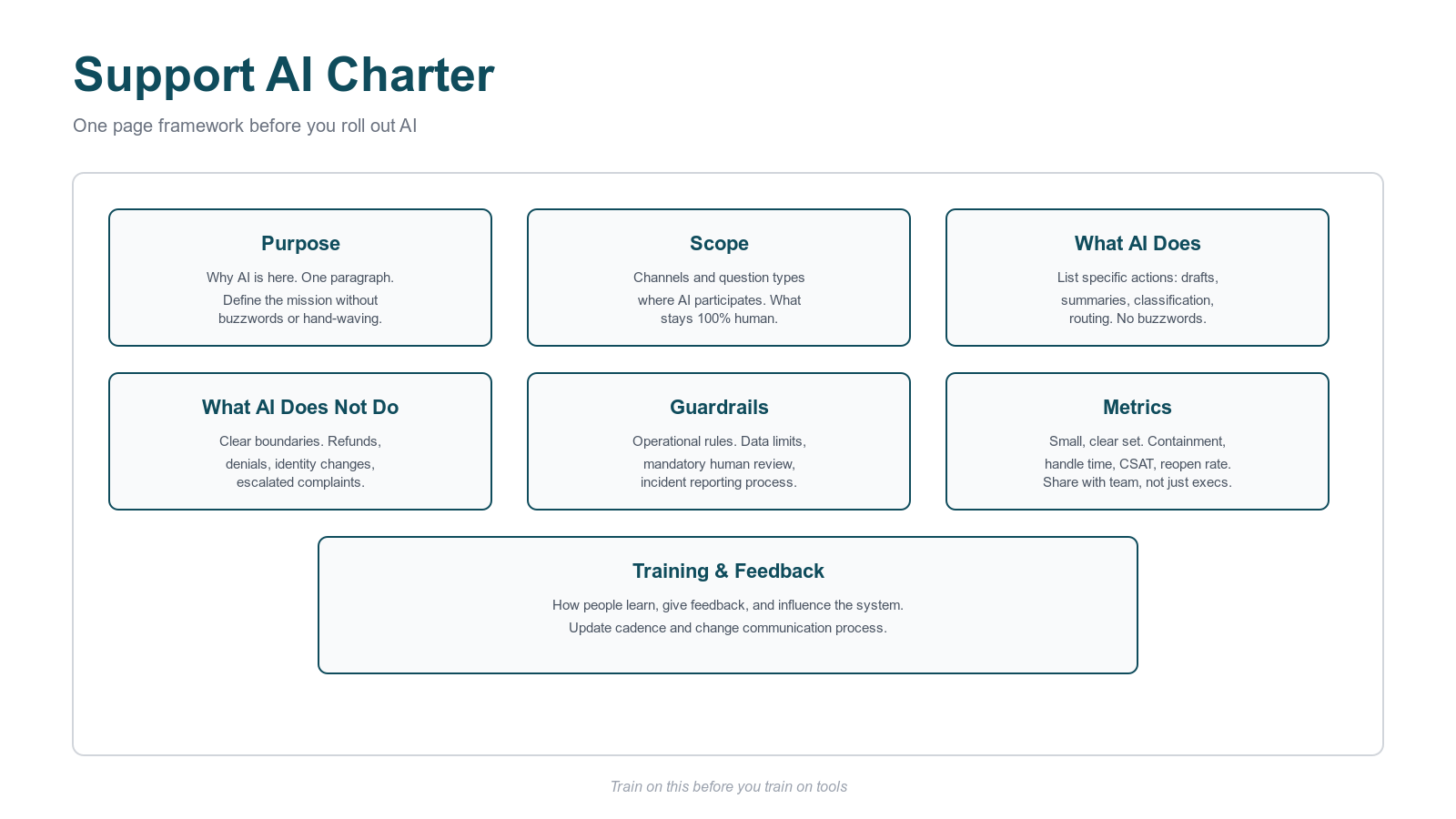
This is a simple, written definition of how AI fits into the work.
No marketing language. No hand waving. Clear rules.
WHY YOU NEED AN AI CHARTER BEFORE YOU ROLL OUT AI
I led a large support org for state funded education programs.
Parents, schools, vendors. Multiple programs. High stakes decisions in the background.
The AI wish list was long.
Chat for repetitive questions.
Voice summaries and transcripts.
Ticket intent classification.
Draft replies inside Zendesk style workflows.
On paper, all of this looked great.
In the team, the mood was different.
Agents heard “efficiency” and thought “my role is at risk.”
Leads felt stuck between protecting their people and saying yes to leadership.
Leaders talked about “productivity” without a shared definition.
If I had started with “Here is how this bot works,” the message under the message would have been “Trust us.” That does not work with people who deal with angry customers all day.
So we wrote an AI Charter first.
That single move did a lot:
Turned vague fear into concrete questions.
Forced leadership to pick clear guardrails.
Gave managers language for 1:1s and team meetings.
Set a baseline for all AI training that followed.
WHAT YOUR TEAM CARES ABOUT
Frontline staff do not hate AI by default.
They hate surprises and half-truths.
These are the themes that came up again and again in real conversations.
Job security
When leaders say “efficiency,” agents hear “fewer people.”
You need to be specific.
If the goal is more volume with the same headcount, say that.
If the goal is to move agents from basic questions to complex work, give examples.
If cuts are on the horizon, do not ask people to train the system while pretending everything stays the same.
People handle hard news better than vague news.
Accountability and blame
Scenario:
AI suggests an answer.
Agent sends it.
Customer complains.
Who owns that outcome?
“Blame the system” is not an option. Someone signs the contract. Someone designs the flows. Someone coaches the team.
The charter needs to state:
Agents own what they send to customers.
Leaders own the design and guardrails of AI systems.
AI output is input. Not a shield.
This protects customers and also protects your agents from being treated as human spellcheck for bad AI design.
Surveillance and micro metrics
Once AI sits in the workflow, rich data appears.
Which suggestions agents accept or reject.
How often they edit AI drafted replies.
Exact handle times per type of ticket.
Your team will assume the worst unless you spell out the plan.
If you use those signals for coaching, say that.
If you do not tie those signals to performance ratings, write that down.
Silence will be interpreted as “this will be used against me later.”
Quality, risk, and hallucinations
Support agents see real edge cases every day. They understand risk better than most people in the company.
They know AI can sound confident and still produce:
Wrong policy details.
Wrong dates.
Steps that do not exist in the product.
You need a simple shared model for risk.
Topics that always need verification.
Flows that never reach full automation.
A fast way to report “confident but wrong” AI output.
If you want agents to trust AI, you need to show that you respect the risk they hold.
Workload and pace of change
Bad AI rollouts create a familiar pattern.
Same work. More steps. Pressure to move faster.
A good AI Charter connects AI to workload in a concrete way.
Which tasks shrink or disappear.
Which tasks move into “AI assist” mode.
Which higher value work agents will pick up as a result.
Without that link, “efficiency” translates into “do more with less and do not complain.” That kills adoption.
PRINCIPLES FOR AI IN SUPPORT
The charter needs a few principles your team can repeat without a slide deck.
Principle 1: AI assists, humans decide
AI drafts, summarizes, classifies, and suggests.
Humans decide what goes out and what happens on an account.
This keeps ownership with people and sets an expectation of review.
Principle 2: Human accountability
Leaders stay accountable for system design, tuning, and guardrails.
Agents stay accountable for what they send or approve.
When something fails, the response is:
Do we need to change the system?
Do we need to adjust training?
Do we need to tighten guardrails?
Not “who do we blame.”
Principle 3: Clear boundaries
Some work stays human on purpose.
Examples:
Final decisions on refunds or large financial movements.
Exceptions outside written policy.
Escalated complaints and appeals.
Sensitive identity or access changes.
Your charter lists these scenarios in plain language. No one guesses.
Principle 4: Privacy and data protection
Customer data is not a prompt playground.
The charter explains:
Which tools are approved.
What type of data flows into those tools.
Which data is off-limits.
If there are legal or state rules in play, summarize them in operational terms. Agents need to know what they do in real scenarios, not legal paragraphs.
Principle 5: Transparency for the team
Agents should always know:
Where AI is in their workflow.
How to send feedback.
Who reviews that feedback.
When rules change and why.
Hidden logic destroys trust. Clear rules build it.
HOW WE ROLLED OUT AN AI CHARTER IN PRACTICE
In the education support org, we used a simple sequence.
Step 1: Draft with a small, mixed group
The initial group:
Support leader.
One support manager.
One QA or training lead.
Two senior agents from different queues.
This mix surfaced real operational detail:
Flows where AI replies might confuse families.
Identity and access steps with high risk.
Places where policy was thin and AI would guess.
Step 2: Align with leadership
Operations, product, and legal leadership reviewed the draft.
We answered questions such as:
Which flows stay 100 percent human.
Where AI only assists and never sends full replies alone.
What “acceptable risk” means for each program.
This avoided the classic “support promised one thing, legal meant something else” problem.
Step 3: Present to the full team
We walked through the charter in a live session.
Not a marketing webinar. A working review.
I asked agents directly:
What feels vague.
What feels unfair.
What does not match reality.
The goal was not to sell AI. The goal was to show that the rules match the work.
Step 4: Pilot under the charter
A pilot group started with AI under clear rules.
Examples:
Chatbot for very narrow, high volume FAQ topics.
Agent assist for long ticket or call summaries.
Intent tagging for routing and reporting.
We tracked:
Containment for those FAQ topics.
Handle time change on assisted tickets.
Reopen rate and CSAT where AI played a role.
Pilot feedback led to edits in the charter.
Not quiet tweaks in the background. Visible changes, with reasons.
Step 5: Scale with consistency
Once the pilot data looked stable, more agents joined.
Managers used the charter in coaching.
Training sessions referenced the same principles and rules.
The message stayed consistent:
AI is here to reduce low value work, protect quality, and make your day more focused.
Here are the rules. Here is what stays human. Here is how you give feedback.
HOW TO BUILD YOUR OWN AI CHARTER
You do not need a long document.
You need something your team reads and remembers.
Use this structure for a one page charter.
Purpose
One short paragraph.
Example:
“We use AI in support to reduce handle time on repetitive questions, keep response quality high, and free agents to focus on complex, high judgment work.”
Scope
Channels included in the first phase.
Types of questions where AI participates.
Types of questions that stay human.
Keep it specific. “Email FAQs about status updates” is better than “simple stuff.”
What AI does
List actions, not buzzwords.
Examples:
Draft replies for agent review in defined queues.
Summarize long tickets, calls, and documents.
Classify tickets into standard intent categories.
Suggest relevant help center articles and macros.
Answer narrow FAQ questions within documented policy.
What AI does not do
This list matters more than the previous one.
Examples:
Approve or deny applications, refunds, or claims.
Change account ownership or identity information.
Communicate final decisions in high risk cases without human review.
Override written policy or legal requirements.
Guardrails
Operational rules, not vague “we take privacy seriously” lines.
Examples:
No passwords, private keys, or secret values in prompts.
No use of unapproved external tools for customer data.
Mandatory human review for refunds, denials, and escalated complaints.
A simple tag or form to report incorrect, risky, or biased AI output.
Metrics
Define a small set.
Examples:
Containment rate for flows where AI responds directly.
Handle time trend for AI assisted work.
Reopen rate for tickets where AI played a role.
CSAT trend for tickets touched by AI.
Number and severity of AI related incidents.
Share these metrics with the team, not only executives.
Training and feedback
Explain how people learn and how they influence the system.
Examples:
Every new agent receives AI training within a fixed timeframe.
Supervisors review AI usage during regular coaching.
Agents send AI feedback through a visible, simple process.
The charter owner reviews and updates the document on a set cadence and shares changes.
TAKEAWAY
If you want healthy AI adoption in support, start with one page.
Define:
Why AI is here.
Where AI participates.
What stays human.
How risk is handled.
How success is measured.
Train on that before you train on tools.
If your team trusts the charter, skill training becomes the easy part.
Next in this series:
Part 2. Choosing the first AI use cases your team will trust.