


INTRO
Part 1 covered the foundation. Train your people, clean your workflows, and fix the obvious mess before you point AI at customers.
This part focuses on the next step. Picking your first use cases.
Most AI projects fail for boring reasons. Wrong problems. Wrong scope. No clear goal. The tech is rarely the main issue.
Your job is simple. Decide where AI should help, in what order, and what success looks like.
WHY USE CASE SELECTION MATTERS
If you pick the wrong work for AI, nothing else will save the project.
AI in support is not magic. It is a different type of worker. You need to decide:
What work this worker should take
Which tasks stay with humans
How the two will interact
Wrong use cases lead to:
Low containment
Confused customers
Frustrated agents
Leadership losing trust in AI
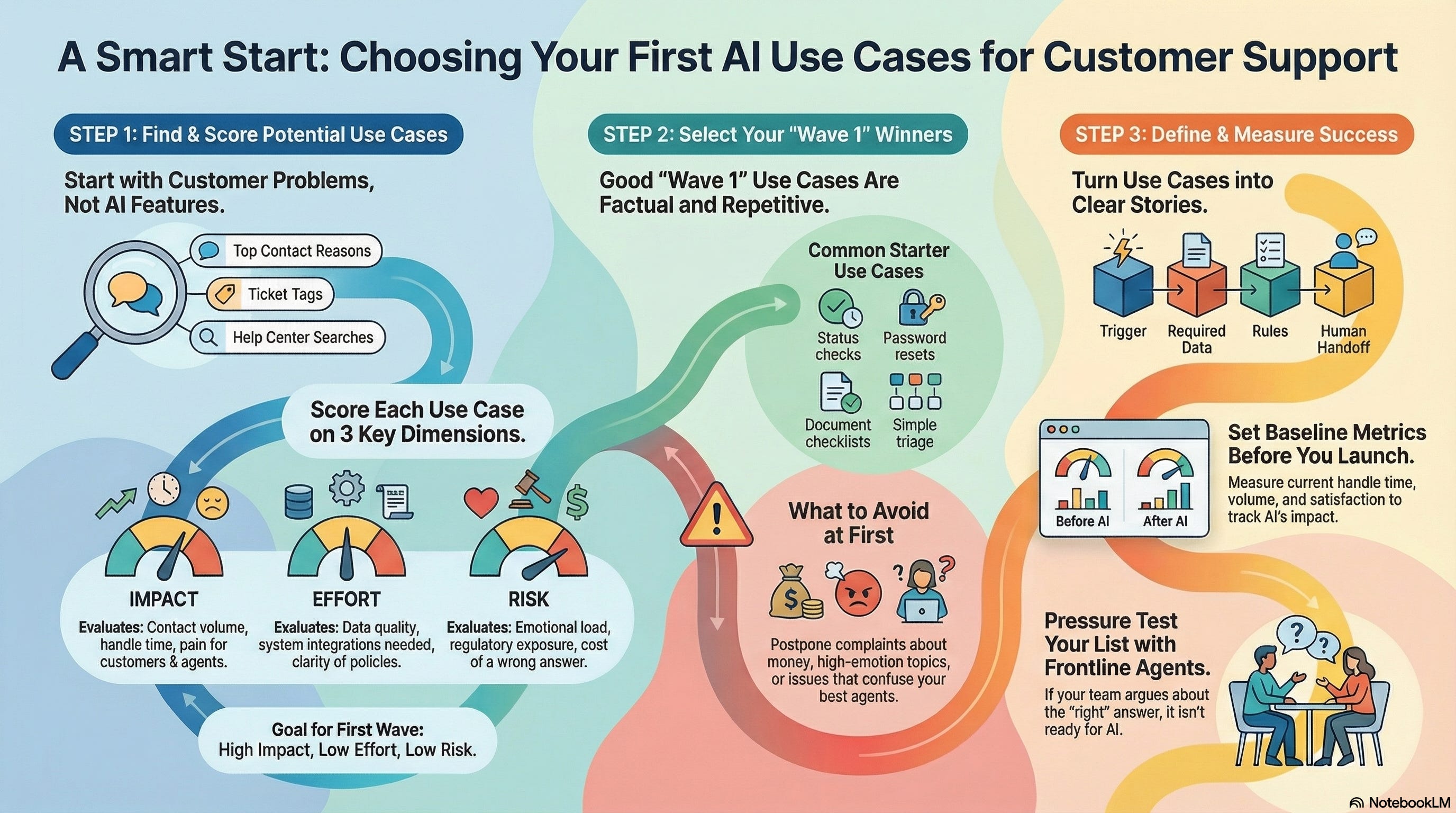
Good early use cases usually share three traits:
Repetitive, high volume questions
Clear rules and stable policies
Low emotional load if something goes wrong
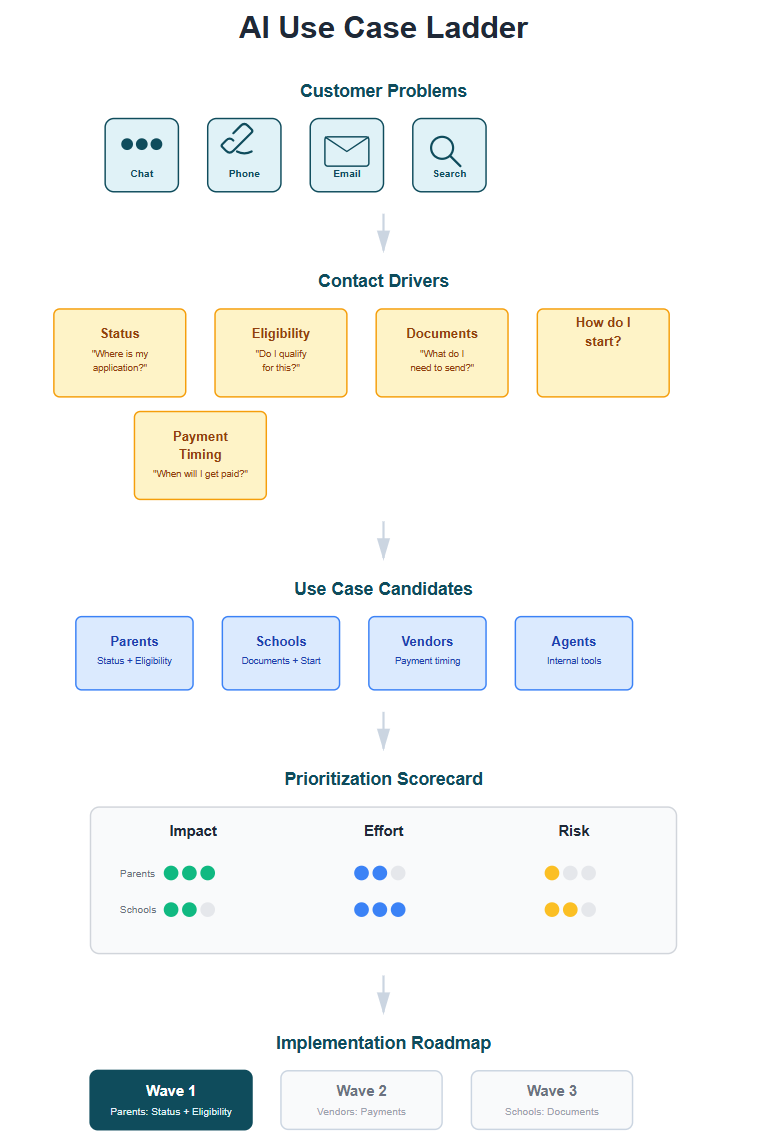
You can see this flow in the AI Use Case Ladder below.
STEP 1: START WITH CUSTOMER PROBLEMS, NOT VENDOR FEATURES
Do not start from “What does the vendor offer?”. Start from “What are people asking for help with?”.
Use real data:
Top contact reasons or intents
Tags on tickets and chats
Voice transcripts
Search terms in your help center
Survey comments
Look for clusters:
Short, factual questions
Step-by-step tasks
“Where is my X?” and “What is the status of Y?”
“How do I start / reset / update this?”
Example from a high volume public program:
Parents asking if their application is complete
Families asking what documents they still need
Schools asking about payment timelines
Vendors asking about onboarding steps
These patterns give you raw material for AI.
STEP 2: TURN PROBLEMS INTO CONTACT DRIVERS
Group those questions into a small set of drivers:
Status
Eligibility
Documents
How to start
Payment timing
These drivers match the yellow cards in the AI Use Case Ladder above.
Each driver should answer a simple question in the customer’s language:
“Where is my application?”
“Do I qualify for this?”
“What do I need to send?”
“What is the first step?”
“When will we get paid?”
This is the level where AI flows start to appear. You are not talking about features. You are talking about what customers want to know.
STEP 3: DEFINE USE CASE CANDIDATES AND WAVES
Now map drivers to specific audiences. Think about parents, schools, vendors, and agents.
Parents
Status + eligibility questions
Document checklists
“What happens next?”
Schools
Documents and how to start
Payment timelines
Vendors
Onboarding steps
When payouts happen
Agents
Internal tools and policy lookups
Quick summaries of long histories
These are your use case candidates.
A SIMPLE SCORECARD: IMPACT, EFFORT, RISK
You do not need a 40-page framework. Use a simple scorecard.
Impact
Volume of contacts
Average handle time
Escalation rate
Pain for customers and agents
Effort
Quality of existing knowledge content
Number of systems involved
Need for product changes or integrations
Clarity of rules and policies
Risk
What happens if the answer is wrong
Regulatory or privacy exposure
Emotional load for the customer
Score each use case from 1 to 5 on impact, effort, and risk.
Then pick a Wave 1 with:
High impact
Low or medium effort
Low or medium risk
Harder or riskier use cases move to later waves.
GOOD EARLY USE CASE TYPES
Type 1: Simple, factual answers
Examples:
Who is eligible for this program
What current deadlines are
Which documents are accepted
How to reset a password or find a link
Type 2: Checklists and prep work
Examples:
Steps to prepare before applying
Document checklists
What to review before a call or appointment
AI guides the user through one step at a time and confirms they are ready before they move on.
Type 3: Status and “where do I stand”
Examples:
Status of an application or order
Whether documents were received
Whether a payout or refund has been initiated
This needs clean data from your systems and clear definitions of “in review”, “approved”, and “paid”.
Type 4: Triage and routing
AI asks a short set of questions and routes to:
Self-service flows with links and steps
A human agent in the correct queue
An escalation path for sensitive topics
Goal: respect the customer’s time and reduce useless transfers.
Type 5: Agent assist behind the scenes
Before you expose AI to customers, let it support your agents:
Suggested answers from the knowledge base
Highlighted policy details
Summarized account history
Key moments from long transcripts
You improve speed and quality while you learn where AI does well and where it struggles.
USE CASES TO AVOID IN WAVE 1
Some work is a bad idea for early waves:
Complaints about money, denials, refunds, or discipline
High emotion topics where tone matters more than speed
Issues that depend on judgment or trade-offs
Workflows that change every few weeks
Anything that still confuses your best agents
If your senior agents debate the right answer, do not send that to AI first.
Save these for Wave 3, or never.
TURN USE CASES INTO CLEAR STORIES
For each selected use case, write a short story instead of a vague label.
Example:
Bad: “AI handles application questions.”
Better:
“When a parent asks if their application is complete, the AI:
Authenticates the user in a safe way
Pulls the application record
Explains the current status in clear language
Lists any missing steps or documents
Offers a link to upload documents or contact support if something looks wrong”
Define for every use case:
Trigger phrase or situation
Data sources required
Rules the AI must follow
When to hand off to a human
What success looks like for this flow
EXAMPLE STARTER PORTFOLIO
Here is a sample Wave 1 package for a support team handling a public program with parents, schools, and vendors.
Parents (Wave 1 focus)
“Am I eligible?” quick check based on a few questions
“Is my application complete?” status check with next steps
“Which documents do I need?” document checklist flow
Schools (Wave 2 candidate)
“What is the payment schedule?” standard policy answers
“How do I submit an invoice?” step-by-step guidance
Vendors (Wave 2 or 3, depending on volume)
“How do I onboard?” sequence of steps with links
“Who do I contact for X?” routing to the correct channel
Agents (can start in parallel with Wave 1)
Real-time suggested replies for top 20 questions
Summary of long tickets before escalation
This mix hits high volume work, keeps risk low, and gives your team and leadership quick wins.
PRESSURE TEST YOUR LIST WITH THE TEAM
Do not pick use cases alone in a slide deck.
Pull in:
Frontline agents
Team leads or supervisors
Product or engineering partner
Someone from legal or compliance if needed
Ask four questions for each proposed use case:
Do we agree on the right answer in most cases?
Do we have policies written in plain language?
Do we know which systems hold the data?
When should a human take over?
If the room spends ten minutes arguing about edge cases, move that use case to a later wave.
STEP 4: ATTACH METRICS BEFORE YOU LAUNCH
For each use case, define:
Baseline weekly volume
Average handle time today
Escalation rate
Recontact rate within 7 days
CSAT or a proxy such as thumbs up / down in chat
Then set targets:
Containment or deflection rate for AI flows
New handle time for human handoffs
Expected drop in repeat contacts
Target CSAT equal or better than current levels
If you do not set these targets before launch, every discussion later turns into “I feel like this is working” versus “I feel like this is not”.
CHECKLIST
Before you start training your AI, answer these questions:
Do we know our top 10 contact drivers with data, not opinions?
Have we scored use cases on impact, effort, and risk?
Have we picked a clear Wave 1 and parked the rest?
Does each use case have a short story and guardrails?
Do frontline agents agree this work is suitable for AI?
Do we have baseline metrics and targets?
If the answer is yes across the board, AI stops being a science project and becomes normal operational work.
If you only remember three things, make them these:
Start from customer problems, not from vendor features.
Pick low-risk, high-volume work for Wave 1 and write clear stories for each use case.
Attach real metrics before launch so you can prove, not guess, that AI is helping.
Part 3 will cover how to train AI on these use cases and keep it honest over time.