


INTRO
Part 1 asked a basic question: What is AI here for?
Part 2 focused on choosing the first use cases your team trusts.
This part moves to the daily work.
How agents talk to AI during real tickets.
Most generative AI tools will answer almost anything.
The problem is not access. The problem is vague prompts during a busy day.
“Summarize this.”
“Write a reply.”
“Fix this message.”
This kind of prompt gives random output.
Tone shifts.
Details go missing.
Quality drifts from agent to agent.
You do not need prompt engineers for support.
You need simple habits which fit inside a normal shift.
In my teams, one pattern made the difference:
Context + task + constraints + tone + format.
Once agents used this pattern, output quality improved.
Reviews went faster.
Training felt lighter.
People stopped asking “What should I type here.”
WHY PROMPTS MATTER IN SUPPORT
Support work runs on context.
Who is this person.
What happened before.
Which rules apply.
AI has zero context until someone gives it.
If prompts stay vague, AI fills gaps with guesses.
Good prompts do three things for support agents:
Reduce rewriting.
Protect policy and tone.
Save attention during peak hours.
The goal is not perfection. The goal is consistent, safe help for real work: summaries, reply drafts, translations, and policy checks.
THE GAP: TRAINING NON TECHNICAL AGENTS
In one education support org, most frontline agents were not technical.
Many had deep program knowledge.
Most had never used tools like this before.
The first attempt at training went wrong.
We gave theory, examples from the internet, and long lists of “prompt tips”.
Agents nodded along.
Then went back to free text prompts such as “write a nice reply”.
Output looked random.
Quality checks took more time.
Trust in the system dropped.
So we reset the plan around one pattern.
We kept one idea.
A fixed pattern which works for nearly every task:
Context + task + constraints + tone + format.
We wrote this at the top of a simple one page guide.
We used real tickets in every example.
We left theory for later.
Within a few weeks, prompts looked cleaner.
Agents started to correct each other in chat.
Leads spent less time editing.
TEACH HABITS, NOT THEORY
Prompt training should feel like normal handle time coaching.
Practical.
Specific.
Rooted in your own tickets.
Three rules helped.
First, always start from a real ticket or call.
No generic samples.
No made up products.
Second, limit the pattern to one line per element.
If the template feels long, no one uses it during peak hour.
Third, do not chase every new trick.
Lock in one pattern for a quarter.
Refine examples based on QA and agent feedback.
THE PATTERN: CONTEXT + TASK + CONSTRAINTS + TONE + FORMAT
This pattern gives structure without a long script.
Context
Short description of the situation.
Who the customer is.
What happened.
Links to any text, transcript, or ticket history.
Task
One clear verb.
Summarize, draft, translate, explain, list, highlight.
Constraints
Rules and guardrails.
What to avoid.
What to include.
Any policy limits.
Tone
How the message should sound for this channel and audience.
Format
Shape of the output.
Bullets, short paragraphs, numbered steps, or a table.
Here is how this looks in practice.
Example 1 - Call summary for a ticket log
Context:
“This is a transcript of a 12 minute call between a parent and support about a delayed payment.”
Task:
“Summarize the call.”
Constraints:
“Use plain language. No promises about future approvals or payments. Include only facts from the call.”
Tone:
“Neutral and clear.”
Format:
“3 bullet points, plus one line for next step.”
Full prompt:
“Here is a transcript of a 12 minute call between a parent and support about a delayed payment. Summarize the call in plain language, with no promises about future approvals or payments, and include only facts from the call. Use a neutral and clear tone. Format the result as 3 bullet points plus one line for the next step.”
Example 2 - Draft reply based on a policy article
Context:
“Here is our policy article about document deadlines. Here is the customer email asking for an extension.”
Task:
“Draft a reply which explains the current policy.”
Constraints:
“Do not offer any exception. Do not change dates. Refer to policy instead of personal opinion.”
Tone:
“Respectful and firm.”
Format:
“Short email with greeting, 2 paragraphs, then a link to the policy article.”
This structure trains agents to think about risk, tone, and format before they hit enter.
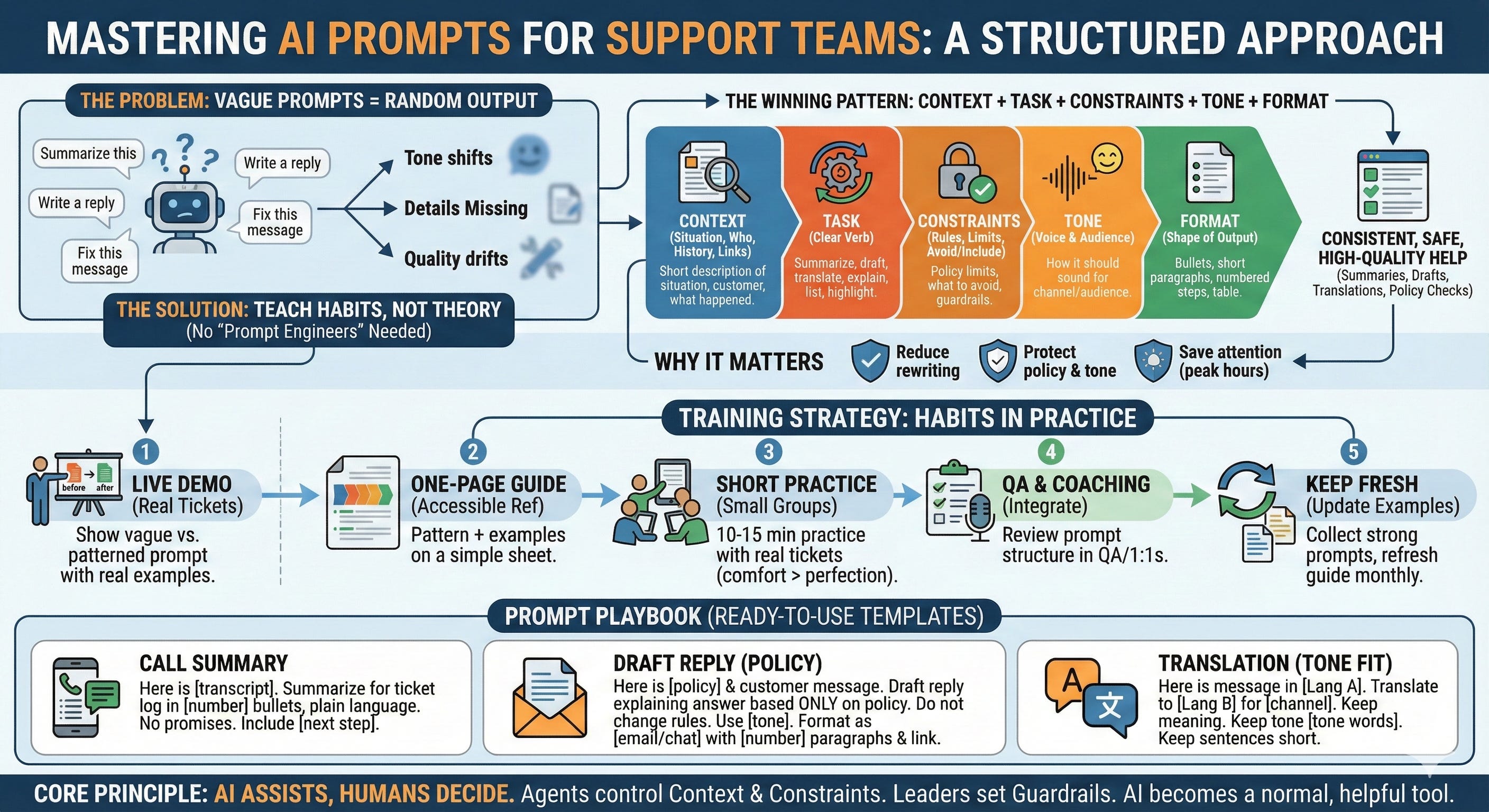
Summary of the prompt pattern, training sequence, and prompt playbook we use with support teams.
PROMPT PLAYBOOK FOR SUPPORT TEAMS
A Prompt Playbook turns the pattern into ready to use templates.
Label each prompt by task.
Keep all examples grounded in your own work.
Below are seven patterns which worked in production.
Call or chat summary for ticket logs
Goal:
Fast, consistent summaries which help the next agent or an escalations team.
Template:
“Here is [call transcript or chat log]. Summarize this conversation for the ticket log in [number] bullet points, in plain language. Do not make promises or add new information. Include [next step / current status].”
Example:
“Here is a transcript of a call between a parent and support about an application which shows as ‘under review’. Summarize this conversation for the ticket log in 3 bullet points, in plain language. Do not make promises or add new information. Include the next step for the parent.”
Draft reply from a policy or help center article
Goal:
Turn dense policy into a clear reply without inventing rules.
Template:
“Here is our policy or help center article on [topic]. Here is the customer message. Draft a reply which explains the answer based only on the policy. Do not change dates, amounts, or eligibility rules. Use [tone]. Format the reply as [email / chat message] with [number] short paragraphs and a link to the article.”
Example:
“Here is our help center article on payment timelines for approved applications. Here is the customer email. Draft a reply which explains the answer based only on the policy. Do not change dates, amounts, or eligibility rules. Use a calm and clear tone. Format the reply as an email with 2 short paragraphs and a link to the article.”
Translation with tone and channel fit
Goal:
Serve multilingual families or partners while keeping tone aligned with channel norms.
Template:
“Here is a message we plan to send in [language A]. Translate this message into [language B] for a [channel, such as SMS or email]. Keep the meaning the same. Keep the tone [tone words]. Keep sentences short for this channel.”
Example:
“Here is a message we plan to send in English. Translate this message into Spanish for SMS. Keep the meaning the same. Keep the tone friendly and respectful. Keep sentences short for text messages.”
Explain policy in plain language
Goal:
Help agents turn legal or policy language into something a stressed parent understands.
Template:
“Here is the policy text about [topic]. Explain this in plain language for a [parent / school / vendor] who has no background in this program. Avoid legal terms. Use short sentences. End with what they should do next.”
Example:
“Here is the policy text about document deadlines for the program. Explain this in plain language for a parent who has no background in this program. Avoid legal terms. Use short sentences. End with what they should do next.”
Find policy details and highlight risk points
Goal:
Help agents see where risk sits before they answer.
Template:
“Here is the policy article on [topic]. List the rules which affect [customer situation]. Highlight any parts with higher risk for mistakes or complaints. Use bullet points.”
Example:
“Here is the policy article on refund eligibility. List the rules which affect a parent who wants a refund after spending funds on a non approved item. Highlight any parts with higher risk for mistakes or complaints. Use bullet points.”
Build a checklist for customers
Goal:
Guide customers through steps without long walls of text.
Template:
“Here is information about the process for [task]. Create a step by step checklist for a [parent / school / vendor] who is new to this process. Use numbered steps. Keep each step to one sentence. Include links only where they help progress.”
Example:
“Here is information about the process for submitting an application. Create a step by step checklist for a parent who is new to this process. Use numbered steps. Keep each step to one sentence. Include links only where they help progress.”
Summarize account history for escalations
Goal:
Give escalations a fast view of what happened before.
Template:
“Here is the ticket history for this account, including past emails, calls, and internal notes. Summarize the history in [number] bullet points. Focus on key events, decisions, and any promises made. End with one line which explains the current status and one line with a suggested next step.”
Example:
“Here is the ticket history for this account, including past emails, calls, and internal notes. Summarize the history in 5 bullet points. Focus on key events, decisions, and any promises made. End with one line which explains the current status and one line with a suggested next step.”
HOW TO TRAIN YOUR TEAM ON PROMPTS
A Prompt Playbook only helps if agents see it as part of normal work.
This sequence worked in practice.
Step 1: Live demo with real tickets
Pick three tickets from last week.
One simple.
One messy.
One escalation.
Show the “before” version where an agent types a vague prompt.
Show the output.
Then apply the pattern:
Context + task + constraints + tone + format.
Show the new output.
Let agents compare.
Step 2: One page prompt guide
Turn the pattern and the seven prompts into a single page.
Include one short example for each pattern.
Post it in whatever place agents already use for quick references.
Step 3: Short practice in small groups
During training or a weekly meeting, split into small groups.
Give each group a real ticket.
Ask them to write a prompt using the pattern.
Share prompts and outputs with the room.
The goal is not perfection. The goal is comfort.
Step 4: Bring prompts into QA and coaching
Add one line to your QA form:
“Did the agent give enough context and constraints in the prompt.”
During 1:1s, review a few AI assisted tickets.
Coach on prompt structure, not only on the reply.
Step 5: Keep examples fresh
Every month, collect a few strong prompts from the floor.
Refresh the guide with new examples.
Retire patterns which no one uses.
PROMPTS AND ACCOUNTABILITY
Part 1 set a principle:
AI assists, humans decide.
Good prompts support this principle.
When agents provide context and constraints, they stay in control.
They decide which policies matter.
They decide how direct or gentle the tone should feel.
They decide how much detail fits in an SMS versus an email.
Leaders stay responsible for the system and guardrails.
Agents stay responsible for what they accept and send.
Prompt training becomes part of this shared accountability.
LINKING BACK TO PART 1 AND PART 2
Part 1 gave your team a Charter.
Part 2 helped you select early use cases with clear value and manageable risk.
Part 3 sits between the two.
The Charter protects people and defines boundaries.
Use case selection tells you where AI helps first.
Prompt training tells agents how to work with AI inside those boundaries.
TAKEAWAY
Your agents do not need a second job as prompt engineers.
They need one simple pattern:
Context + task + constraints + tone + format.
Turn this pattern into a short Prompt Playbook.
Ground every example in your real tickets.
Review prompts during QA and coaching.
If you get this right, AI assist starts to feel like another normal tool in the support workflow.
Not magic.
Not a threat.
A helper which respects the way your team already serves customers.
Next in this series:
Part 4. Measuring AI impact in support and keeping systems honest over time.