


INTRO
Part 1 defined the role of AI.
Part 2 focused on picking the right use cases.
Part 3 trained agents on prompting without turning them into prompt engineers.
Part 4 covered measurement, so outcomes stay tied to customer reality.
Part 5 covers change management, so adoption sticks as scope expands.
Most AI rollouts fail for boring reasons.
Confusion.
Mistrust.
No owner.
No feedback loop.
No coaching plan.
A tool ships, then usage fades.
Your goal for Part 5:
Create adoption with discipline.
Keep morale stable.
Scale without chaos.
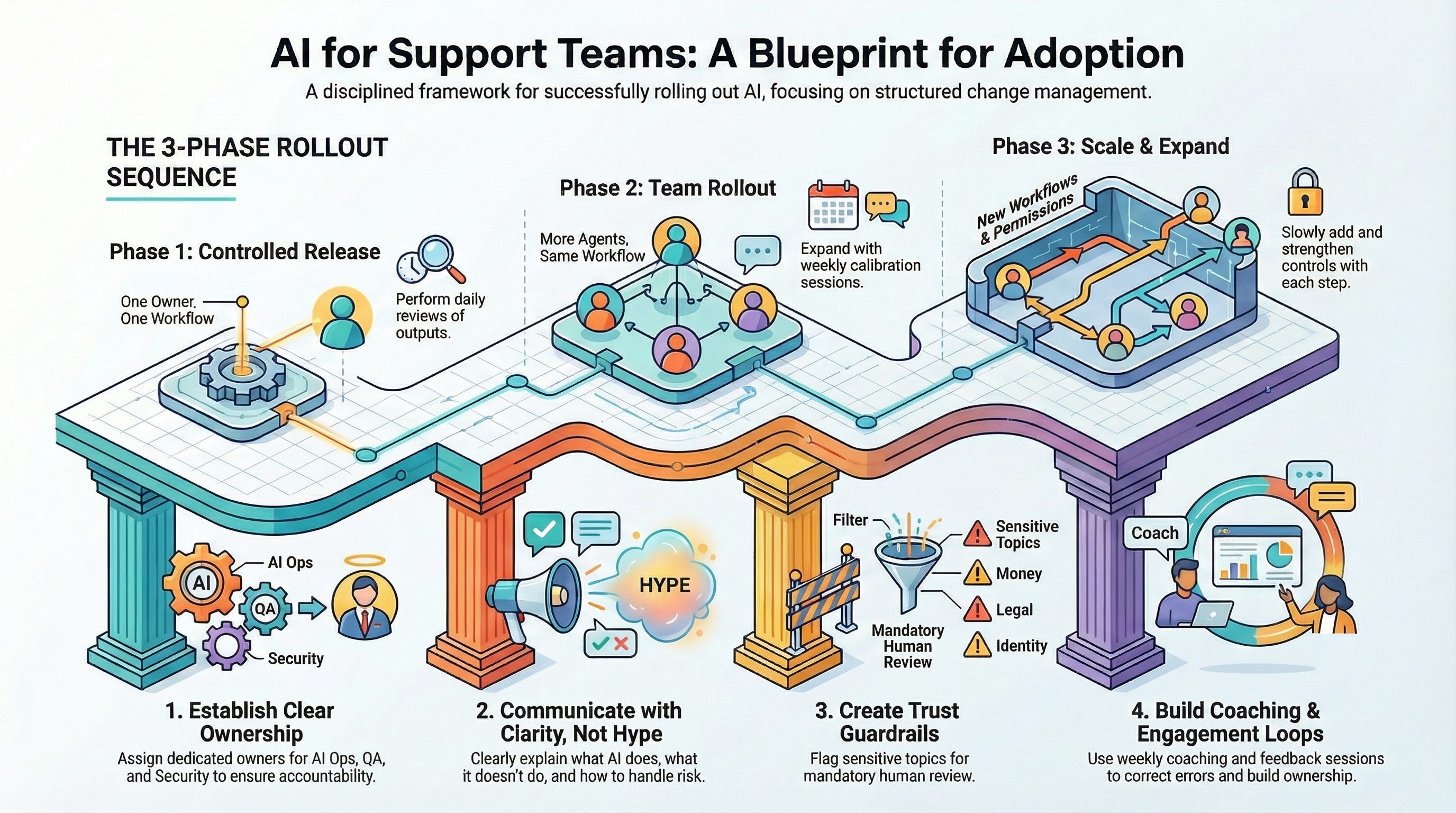
Change management map for AI in support
THE CORE PROBLEM
AI changes work behavior.
Support teams run on habits.
Habits do not change from one announcement.
Three common failure patterns:
Leadership pushes usage, agents do not trust outputs.
A few power users sprint ahead, everyone else stops trying.
AI ships without guardrails, one bad incident kills momentum.
The fix:
Rollout sequencing.
Training cadence.
Coaching loops.
Trust guardrails.
START WITH A ROLLOUT SEQUENCE
Why this matters:
A phased rollout keeps confusion low, keeps QA manageable, and prevents “big bang” failures.
Phase 1: Controlled release
What success looks like:
• One state, one queue, or one workflow
• Clear owner
• Daily review of outputs
• Tight feedback to prompts, macros, and KB
Phase 2: Team rollout
What success looks like:
• Same workflow, more agents
• Weekly calibration
• Clear red flag routing
• Adoption tracked by shift and team
Phase 3: Scale and expand
What success looks like:
• Second workflow added
• Decision points introduced slowly
• Controls strengthened with each new permission
OWNERSHIP MODEL
Why this matters:
Without a named owner, AI becomes a “tool someone else manages.” Support teams ignore tools owned by nobody.
Define three roles:
• AI Ops Owner
Owns the rollout plan, measurement, weekly changes, and decision logs.
• QA Partner
Owns sampling, defect tagging, and coaching signals.
• Security and Privacy Partner
Owns boundaries, approvals for access, and incident response.
One owner. One backlog. One weekly shipping rhythm.
COMMUNICATION THAT DOES NOT FEEL LIKE HYPE
Why this matters:
Hype creates skepticism. Skepticism kills adoption.
Use three messages, repeated often:
What AI does
What AI does not do
What to do when risk appears
Avoid grand claims.
Use one workflow example.
Show one before and after.
TRAINING THAT BUILDS MUSCLE MEMORY
Why this matters:
Teams need simple rules that survive turnover. Training must feel like real work, not a product demo.
Run a 30 minute training for each rollout phase.
Session format:
Show one correct output and why
Show one wrong output that sounds confident and why
Run a red flag drill with five ticket snippets
Practice an escalation handoff note
Repeat quarterly.
Add to onboarding.
COACHING LOOP
Why this matters:
Bad outputs turn into bad beliefs fast. Coaching corrects belief before behavior hardens.
Weekly coaching plan:
• Pull ten AI assisted replies per agent per week during controlled release
• Tag defects by type, not by blame
• Share two “good patterns” and two “bad patterns” every week
Keep coaching concrete.
Focus on the work product.
ENGAGEMENT LOOP
Why this matters:
People adopt tools when people feel heard. Feedback creates ownership.
Run three lightweight engagement loops:
• Office hours, 30 minutes weekly
Agents bring examples. Owner ships fixes.
• Champion rotation
Pick two rotating champions per month. Keep champions fresh.
• Win log
Share one win per week tied to time saved or customer outcome.
Do not reward volume.
Reward clean outcomes.
ADOPTION METRICS THAT MATCH REAL WORK
Why this matters:
Adoption without outcomes creates busywork. Outcomes without adoption create fragile success.
Track:
• Usage rate by workflow
• Reopen rate for AI assisted replies
• QA defect rate tied to AI assisted replies
• Escalation volume by red flag category
• Time saved in the specific workflow
Report weekly.
One page.
One action per metric.
TRUST GUARDRAILS
Why this matters:
Trust fails fast. Guardrails protect customers and protect team confidence.
Red flag topics that require human verification:
Money and eligibility
Deadlines and promises
Legal and enforcement language
Identity and account access
Sensitive personal data
When a red flag appears:
Stop.
Find a source.
Escalate or route.
The 10 second stop rule:
Identify the claim
Find the source
Write the reply with the source referenced
If no source exists, escalate
No source, no promise.
Privacy guardrails:
Never paste:
• Full name plus date of birth
• Government ID numbers
• Bank routing or account numbers
• Full documents or screenshots with identifiers
Use placeholders:
• [Student ID]
• [Application ID]
• [School name]
• [Ticket number]
Use AI for structure, not identity decisions.
Example prompt pattern:
“Draft a reply template in plain language. Use bracket fields for staff. No promises. Add escalation step.”
HOW TO KEEP MOMENTUM AS SCOPE EXPANDS
Why this matters:
Scale creates cognitive load. Cognitive load triggers abandonment.
Rules for scale:
• Add one workflow at a time
• Add one new data source at a time
• Re-run red flag testing after each scope change
• Publish a short change log every week
Make the work feel stable.
Ship small changes often.
TAKEAWAY
Change management is the product.
Tooling is the easy part.
Engagement is the hard part.
Guardrails keep adoption alive.
NEXT
Part 6 will cover risk, privacy, hallucinations, and controls in deeper detail, with testing patterns and defect taxonomy.