


This series is about making AI work in real support teams, with real tickets, and real risk.
If you want the earlier parts first:
Part 1: Intent data as a product
Part 2: The AI Quality Loop
Part 3: Teaching agents to prompt without turning them into prompt engineers
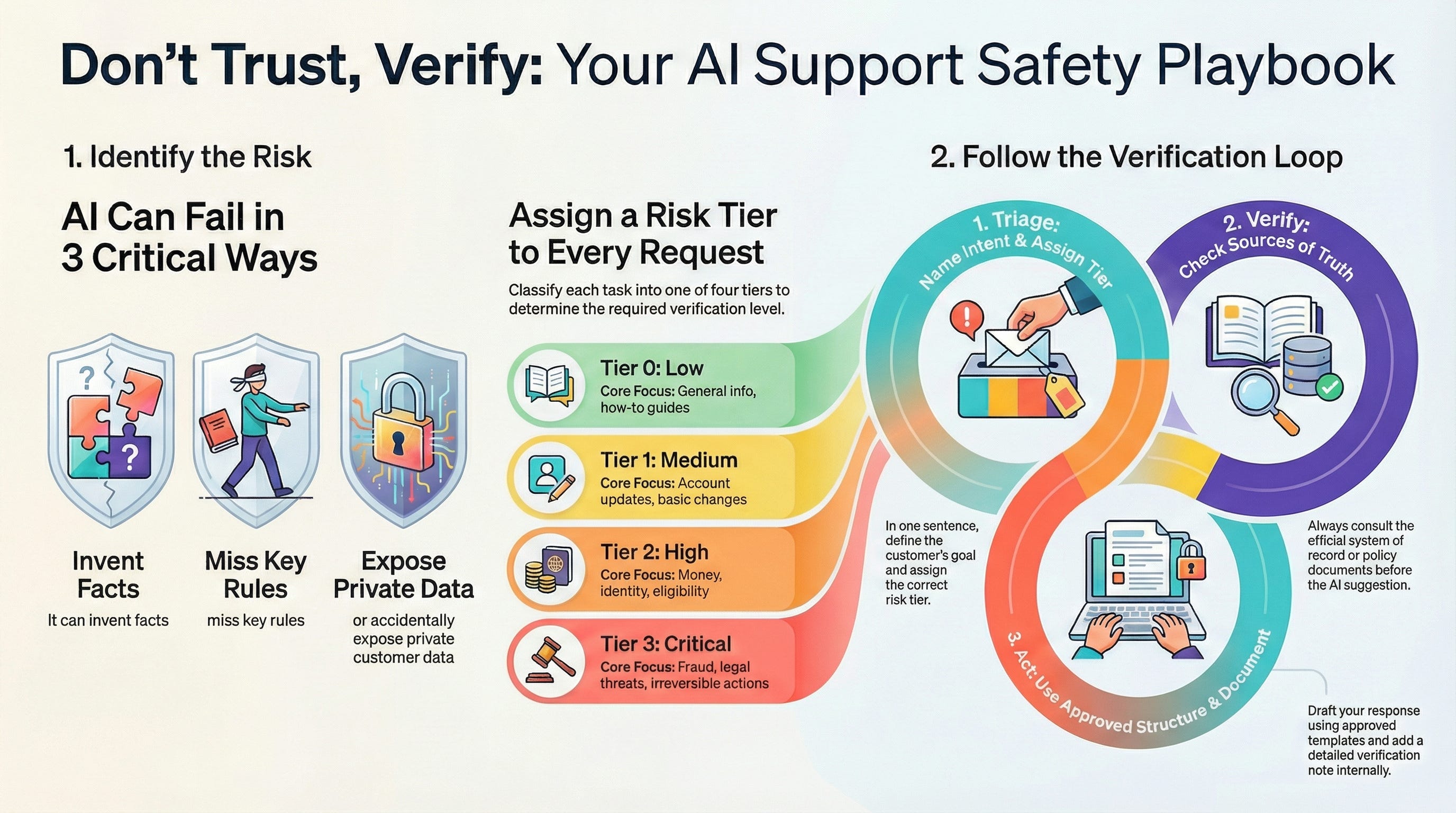
Intro
AI accelerates support and introduces risk.
Three risks show up every day: hallucinations, missing constraints, data leaks.
Adopt one operating rule: No Hero Moves.
Agents follow Verify-then-Trust, driven by a risk tier.
Speed matters. Accuracy matters more.
Where AI Fails
Hallucinations
AI invents facts.
Common examples:
New policy rules, deadlines, required documents
Fake links or form paths
Fake system events, “Payment processed yesterday,” “Your request is approved,” “Account updated”
Missing constraints
AI skips a critical rule.
Common examples:
Product-specific nuance
Policy effective date changes
Pricing plan changes
Role and permission limits
Exception paths and edge cases
Data exposure
AI output or agent behavior leaks sensitive data.
Common examples:
SSN, DOB, bank details, full address
Document numbers
Private internal notes copied into public replies
The No Hero Moves Rule
No guessing.
No improvising policy.
No sending links you did not open.
No quoting sensitive data back to the customer.
No “I think” responses on Tier 2 or Tier 3 work.
Risk Tiers
Assign a tier at the start of every interaction.
Tier sets the standard of verification.
Tier 0: Link and Move
Scope:
General how-to, navigation, hours, basic troubleshooting
Agent standard:
Use the approved KB article. Send a verified link. Move on.
Do not improvise steps. Do not add policy language.
Tier 1: Verify the Record
Scope:
Account access, profile updates, routine workflow questions, partner onboarding steps
Agent standard:
Check the system of record before replying.
Use an approved macro or template.
Add an internal verification note before sending the public reply.
Send only links you clicked.
Tier 2: Two-Source Verify
Scope:
Money movement, identity, access changes, entitlements, contract terms, high-impact exceptions
Agent standard:
Verify using two sources: system of record plus official documentation or policy source of truth.
Use the Tier 2 structured script. No free-form explanations.
Add an internal verification note with both sources listed.
Escalate when sources conflict, when documentation is unclear, or when the customer requests an exception.
Tier 3: Stop and Escalate
Scope:
Fraud signals, security incidents, legal threats, compliance requests, audit requests, irreversible actions
Agent standard:
Do not respond publicly.
Preserve evidence. Document the issue in an internal note.
Escalate to the defined owner. Security, legal, compliance, or leadership.
Use only the approved holding response if your process requires one.
The Verify-then-Trust Loop
Use this loop for every Tier 1 to Tier 3 interaction.
Step 1: Name the intent
Write one sentence.
Example: Parent requests email change for account access.
Step 2: Assign risk tier
Tier 0 to Tier 3.
Step 3: Pull sources of truth, in order
System of record
Official documentation or policy source of truth
Internal knowledge base
Runbook or SOP
AI suggestion
Step 4: Verify critical fields
Use a checklist based on intent.
Examples:
Identity: Name match, verified contact method, account identifiers
Money: Transaction ID, amount, date, approval status, timestamp
Eligibility: Plan, entitlement, policy version, effective date
Step 5: Draft response
Use short steps.
Avoid absolute claims without proof.
Use approved language for Tier 2 and Tier 3.
Step 6: Add a verification note
Log intent, tier, sources, fields, next action.
Step 7: Escalate on triggers
Escalate when any trigger shows up:
Conflicting sources
Missing source of truth
Customer requests an exception
Legal language, complaint escalation, audit references
AI output introduces new policy language
Request touches identity, money movement, eligibility, fraud
Privacy in Daily Work
Data minimization
Ask for the smallest data set required for the next step.
Avoid collecting sensitive data during triage.
Redaction
Mask sensitive fields in public replies and internal notes:
SSN
DOB
Bank details
Document numbers
Full address when not required
Channel rules
Chat
No requests for sensitive documents
No collection of bank details, SSN, full DOB
Use secure upload links, not attachments, when policy requires
Avoid quoting sensitive data back to the customer
Internal tools
No sensitive customer data in Slack, project trackers, or non-secure threads
No screenshots with sensitive fields shared outside secure channels
The 5 Hallucination Signals
Train agents to scan AI output for five signals.
Confident policy
Signal: “The program requires X” with no source.
Check: Search internal KB. Confirm official policy page, then confirm internal KB mirrors.
Verdict: Delete any rule without a source.Fabricated system state
Signal: “Application approved,” “Payment sent,” “Account updated.”
Check: Open system of record. Confirm status and timestamps.
Verdict: Treat AI status claims as false until system evidence exists.Phantom link
Signal: URL looks plausible, path looks generic or unfamiliar.
Check: Open the link. Confirm correct domain and page content.
Verdict: Send only links verified by the agent.Extra steps
Signal: AI adds approvals, forms, signatures, extra steps.
Check: Compare with runbook steps.
Verdict: Follow runbook. Remove ghost steps.Audience mix-up
Signal: End user vs admin vs billing owner vs developer vs partner.
Check: Confirm role in system of record.
Verdict: Match steps and tone to user type.
Rollout Plan
QA scorecard for Tier 1+
Score every Tier 1 to Tier 3 ticket on:
Clear intent statement
Correct risk tier
Sources logged in internal note
Critical fields verified
Approved structure used
Redaction performed
Escalation triggers handled
5-day training sprint
Day 1: Risk tier and intent labeling, 20 real tickets
Day 2: Verification loop drills, internal note writing
Day 3: Privacy and redaction drills, channel examples
Day 4: Hallucination spotting, rewrite unsafe drafts
Day 5: Live QA review, real tickets from the prior week
Copy-Paste Resources
Resource 1: Internal Verification Note Template
Purpose
This private note serves as the receipt for agent decision-making.
Add this note to every Tier 1, Tier 2, and Tier 3 ticket before sending a public reply.
INTERNAL VERIFICATION NOTE

INTENT:
[Single sentence describing the request. Example: User requests payout routing update.]

RISK TIER:
[Tier 0 / Tier 1 / Tier 2 / Tier 3]

SOURCES OF TRUTH CHECKED:
[ ] System of Record (user profile, transaction history, case status)
[ ] Official Docs
[ ] Internal Knowledge Base (article ID or link)
[ ] Runbook or SOP (name or link)

CRITICAL FIELDS VERIFIED:
Identity match: [Yes / No / N/A]
Dollar amount and transaction ID: [Yes / No / N/A]
Eligibility and effective date: [Yes / No / N/A]

REDACTION CHECK:
Sensitive data received from user: [Yes, redacted / No]

NEXT ACTION:
[Example: Send secure form link. Escalate to fraud queue. Request missing document via secure upload.]

END INTERNAL VERIFICATION NOTE
Resource 2: Day 4 Training Checklist
Purpose
Use this checklist during the Day 4 drill.
Run every AI-suggested draft through this scan before using any text.
THE “IS THIS REAL?” SCAN

Confident Policy Trap
Signal: AI states a rule or requirement without a source.
Check: Highlight the rule. Search internal KB. Check official policy.
Verdict: Remove the rule if no source exists.

Fabricated Reality Trap
Signal: AI claims status changes, approvals, payments, or system actions.
Check: Open system of record. Confirm status, timestamps, transaction logs.
Verdict: Treat AI status text as false until system evidence exists.

Phantom Link Trap
Signal: AI generates a plausible URL with an unfamiliar path.
Check: Open the link. Confirm correct domain. Confirm correct page.
Verdict: Send only agent-verified links.

Extra Steps Trap
Signal: AI lists more steps than the official process.
Check: Compare each step to the runbook.
Verdict: Remove ghost steps. Follow runbook steps only.

Audience Mix-up Trap
Signal: AI asks a parent for vendor details, or sends the wrong workflow.
Check: Confirm user role in system of record.
Verdict: Match process and language to user type: parent, student, vendor, school admin.

END CHECKLIST
This piece really made me think, what if the risk is AI generating unforeseen constraints our verification sistems aren't designed to catch?