


Intro
Part 1 defined intent data as a product.
Part 2 introduced the AI Quality Loop.
Part 3 showed a repeatable prompting pattern for agents.
Part 4 set risk tiers and verification loops.
This part builds the guardrail: a testing sandbox.
Most teams ship AI changes straight to production.
Then customers run the first real test.
Support absorbs the damage.
A sandbox answers four questions fast:
Should we ship this change.
Should we roll back this change.
Which intents broke.
Which fix moves outcomes this week.
Quick Takeaways
Build one gold set of real cases. Tag by intent, channel, risk tier.
Write expected outputs for each case. Answer, action, escalation, sources checked.
Score changes before launch. Fail fast on Tier 2 and Tier 3.
Add pass and fail gates. Block unsafe changes by default.
Ship with a rollback path. Prompt rollback, routing rollback, knowledge rollback.
Publish a weekly release log tied to outcomes. Containment, recontact, escalations, CSAT.
Why a Testing Sandbox matters
A support AI system changes often.
Prompts change.
Knowledge changes.
Routing changes.
Policies change.
Product behavior changes.
Without a sandbox, every change becomes a customer experiment.
A sandbox protects:
Customers from wrong answers and wrong actions
Agents from cleanup work and angry follow ups
Leaders from demo based decision making
Trend lines from silent drift
A sandbox also speeds up shipping.
Teams stop debating opinions.
Teams ship changes with proof.
What a support AI Testing Sandbox is
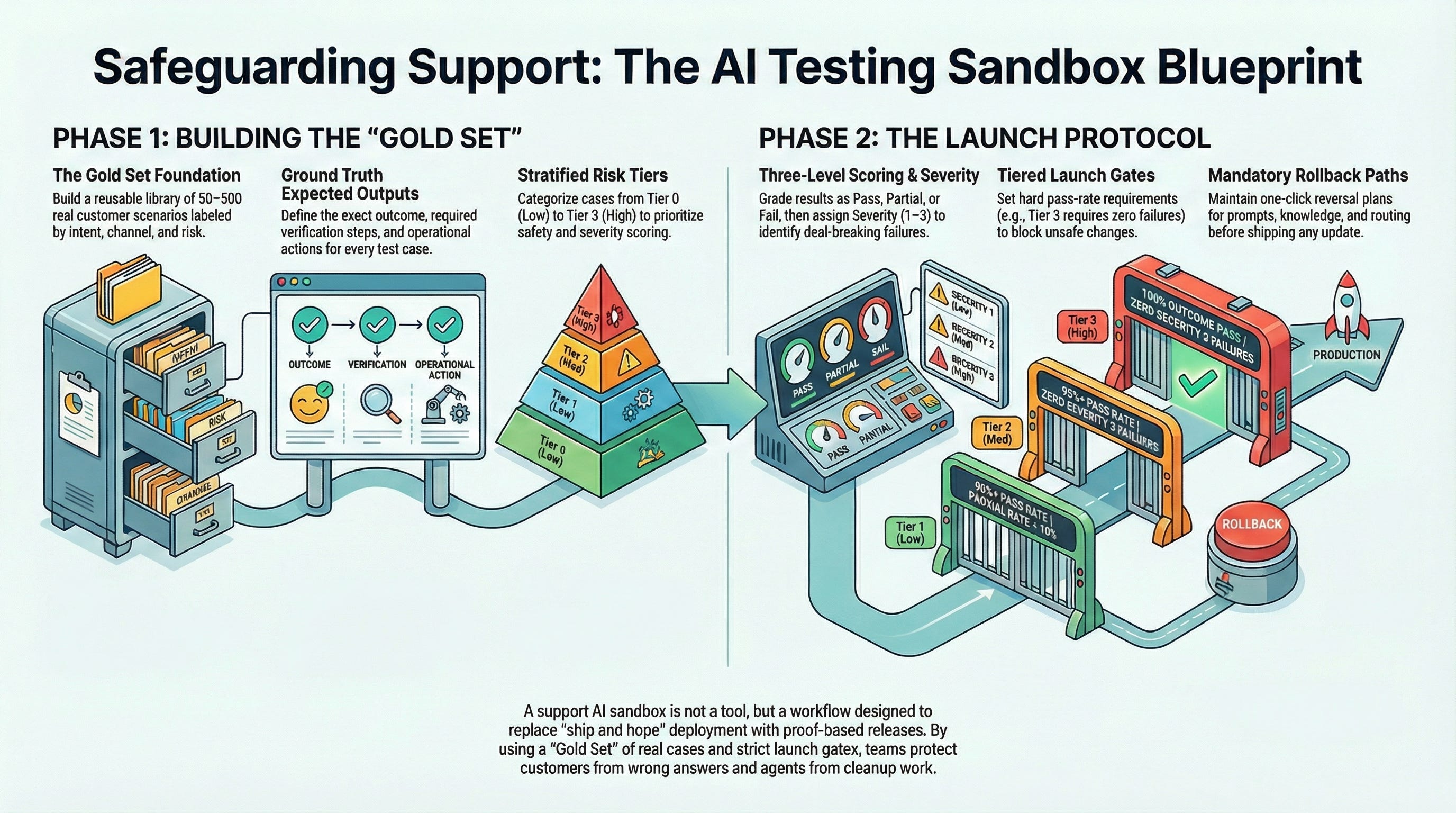
A sandbox is a repeatable test environment with three parts:
Test cases
Real customer scenarios, labeled and representative.Scoring
Clear rules for pass, fail, partial, plus severity.Gates and rollback
Launch rules plus fast reversal when a change fails.
A sandbox is not a separate tool.
A sandbox is a workflow.
What you test in a Support Sandbox
Test the whole customer path, not a single answer.
Answer quality
Correct outcome
Correct policy
Correct scope
Correct next step
Retrieval and citations
Pulls the right article or policy section
Avoids stale content
Avoids unofficial sources
Routing and handoff
Sends the case to the right queue
Passes the right context to the agent
Flags risk tier and required verification
Actions and automations
Creates the right ticket fields
Applies the right tags
Triggers the right workflow
Blocks unsafe actions
Safety
No private data leakage
No identity shortcuts
No financial movement without verification
No legal or compliance advice outside approved language
Build the Gold Set
The gold set is the heart of the sandbox.
Build one set. Reuse forever. Expand slowly.
Target size
Start: 50 cases
Stable: 100 to 200 cases
Mature: 300 to 500 cases per major product area
Composition rules
Cover top intents by volume
Cover top intents by risk
Cover edge cases from escalations
Cover recent incidents and defects
Cover new feature releases and policy updates
Tag every case with three labels
Intent
One operational intent. One expected action.Channel
Chat, email, voice summary, web form, SMS.Risk tier
Tier 0. Tier 1. Tier 2. Tier 3.
Sampling method
Step 1. Pull recent contacts
Pick a window like the last 30 days.Step 2. Stratify by intent
Grab cases from the top 10 to 20 intents.
Add 10 to 20 cases from long tail intents.Step 3. Stratify by risk tier
Minimum per tier:Tier 0: 10
Tier 1: 20
Tier 2: 15
Tier 3: 5
Step 4. Stratify by channel
Make sure each top intent shows up in more than one channel.Step 5. Add known pain
Add cases from:escalations
refunds or reversals
policy disputes
identity changes
vendor or school edge cases
complaint themes
Gold set format
Store the gold set in a simple table.
One row per case.
Columns
Case ID
Intent
Channel
Risk tier
Customer prompt or summary
Ground truth outcome
Required verification steps
Allowed answer boundaries
Expected routing
Required notes or tags
Severity if wrong
Example gold set row
Case ID: GA-042
Intent: Profile Updates. Email address change
Channel: Email
Risk tier: Tier 2
Customer prompt: “Please change my email from old@ to new@. I lost access to old@.”
Ground truth outcome: Change email only after two source verification. If verification fails, route to secure recovery process.
Required verification: Two independent sources. Do not rely on email alone.
Expected routing: Account Recovery queue
Severity if wrong: High
Write Expected Outputs
A gold set without expected outputs becomes a trivia deck.
Expected outputs turn cases into tests.
For each case, write four expectations.
Outcome
What the customer should get.
Approve, deny, request info, escalate, route.Verification
What the agent or bot must verify.
Which system of record fields.
Which documents.
Which call back steps.Response boundaries
What language is allowed.
What claims are not allowed.
Which policy lines must appear.Operational action
Which tags, fields, macros, queues, and workflows.
Keep expected outputs short.
Focus on decisions, not essays.
Scoring and Severity
Your scoring system needs clarity.
Support leaders love nuance.
Test harnesses hate nuance.
Use a three level score for each case.
Pass
Partial
Fail
Then add severity on fails.
Severity 1: Wrong tone, minor confusion, no harm
Severity 2: Wrong answer, recontact likely
Severity 3: Unsafe, privacy risk, money movement risk, irreversible action risk
Tie severity to risk tier.
Tier 2 and Tier 3 failures should stop launch.
Score dimensions
Score each case on these dimensions:
Correct outcome
Correct verification
Correct routing
Safe response boundaries
Correct operational actions
A case passes only when outcome and safety pass.
Partial applies for wording and formatting issues.
Pass and Fail Gates
Gates prevent “ship and hope.”
Start with simple gates.
Tighten after two releases.
Recommended gates for launch
Tier 3
Zero Severity 3 failures
Zero outcome failures
Tier 2
Zero Severity 3 failures
Pass rate 95%+
Tier 1
Pass rate 90%+
Partial rate under 10%
Tier 0
Pass rate 85%+
Partial allowed
Global
No increase in known defect types
No new defect type without owner and fix path
Change level gates
Apply gates based on what changed.
Small change
Prompt copy edits
Knowledge update in one article
Gate: Run gold set subset for impacted intents
Medium change
Routing changes
New intent split or merge
Model change
Gate: Run full gold set
Large change
New channels
New automation actions
New product launch
Gate: Full gold set plus a launch week daily monitor plan
Rollback Paths
A sandbox without rollback is theater.
Define rollback by change type.
Prompt rollback
Store previous prompt version
One click revert, or one pull request revert
Timestamp and owner
Knowledge rollback
Restore previous article revision
Disable new article from retrieval index
Flag stale article for review
Routing rollback
Revert trigger or workflow change
Restore previous queue logic
Turn off new automation path
AI feature rollback
Switch to handoff only mode
Turn off auto actions
Turn off outbound messaging
Write one rollback runbook.
Keep runbook short.
Practice once per quarter.
Release Process
Ship changes like operations, not like a demo.
Standard release flow
Step 1. Propose change
Change description
Impacted intents
Risk tier exposure
Owner
Step 2. Update test plan
Which gold set cases apply
Any new cases needed
Expected outcome updates
Step 3. Run tests
Run the sandbox
Score results
Log defects
Step 4. Fix and retest
Fix top severity first
Retest until gates pass
Step 5. Launch with monitor plan
Define metrics to watch for 48 hours
Assign owner for monitoring
Set rollback trigger thresholds
Step 6. Log release
One line summary
Links to changes
Outcomes after seven days
Weekly Release Log Template
Title
AI Ops Release Log. Week of [date]
Summary
• Change 1
• Change 2
• Change 3
Tests run
• Gold set cases: [count]
• Impacted intents: [list]
• Pass rate by tier:
  Tier 0: [ ]
  Tier 1: [ ]
  Tier 2: [ ]
  Tier 3: [ ]
Defects found and fixed
• Severity 3: [count], owners, fixes
• Severity 2: [count], owners, fixes
• Severity 1: [count], owners, fixes
Launch outcomes
• Containment: [baseline] to [current]
• Recontact rate: [baseline] to [current]
• Escalations: [baseline] to [current]
• CSAT themes: [top 3]
Follow ups
• Case additions to gold set
• Knowledge updates required
• Workflow improvements required
Roles and Ownership
A sandbox fails when nobody owns it.
Minimum roles
Sandbox Owner
Maintains gold set
Owns scoring rules
Runs weekly test cycle
Risk Owner
Approves Tier 2 and Tier 3 changes
Owns verification rules
Owns rollback decisions during incidents
Knowledge Owner
Owns sources of truth
Owns freshness cadence
Reviews retrieval failures
Ops Owner
Owns routing, fields, triggers, automations
Owns deployment steps
Keep approvals narrow.
Keep accountability clear.
14 Day Build Plan
Day 1 to 2. Define scope
Pick 10 to 20 intents
Define risk tiers for each
Define what counts as pass
Day 3 to 5. Build the first gold set
Pull 50 real cases
Tag by intent, channel, risk tier
Write expected outputs
Day 6 to 7. Define scoring and gates
Pass, partial, fail
Severity rules
Launch gates per tier
Day 8 to 10. Run first tests
Test current production behavior
Log failures
Fix top severity
Day 11 to 12. Build rollback runbook
Prompt rollback
Knowledge rollback
Routing rollback
Feature rollback
Day 13. Ship one change through the process
Treat as rehearsal
Time each step
Remove friction
Day 14. Publish first release log
Results
Learnings
Next week plan
Common failure modes
Too few Tier 2 and Tier 3 cases
Teams over test Tier 0 and Tier 1.
Risk hides in the missing tiers.Vague expected outputs
“Good answer” is not a test.
Write outcomes and actions.Scoring without severity
A wrong password reset flow is not equal to wrong punctuation.No rollback drills
Rollback only works when teams practice.No release log
Without a log, nobody learns.
Mistakes repeat.
Close
A sandbox is the cheapest insurance a support org buys.
A sandbox also speeds up shipping.
Teams stop arguing about opinions.
Teams ship changes with proof.
Next up.
AI Ops, Part 6. Defect Taxonomy for Support AI.
Turn failures into labels, owners, and fix paths.