


If you missed Part 8, read it first. If you want the full series from the start, begin with Part 1.
AI answers run inside live support. Live support needs an incident desk.
When AI fails mid-shift
Tuesday, 2:17 p.m.
A parent asks a simple eligibility question in chat. The AI replies fast. The wording sounds official. An agent trusts the draft and sends the same answer in email to three more families. A team lead copies the response into a macro to help the rest of the team move faster.
Fifteen minutes later, the wrong answer becomes the default answer.
Then the follow-ups hit. A school forwards a screenshot. A state rep escalates. Your queue turns from normal work into clean-up. Agents stop trusting drafts, even on questions where AI usually performs well. Leaders ask for an update, then another update, then a timeline.
One bad response did not break the shift.
The lack of a system broke the shift.
Why the failure spreads
A product bug stays in one place. An AI failure spreads through people.
Support teams move fast under pressure. People copy language, reuse answers and build workarounds. A response that “reads right” travels farther than a response that looks broken.
The outcome gets worse because AI outputs look confident. The risk comes from tone and certainty, not only from accuracy. A wrong answer with confident wording turns into a broken promise. Customers remember the promise. Agents remember the embarrassment. Leaders remember the escalation.
During the same thirty minutes, well-meaning fixes start appearing everywhere. Someone edits a macro, changes routing, tweaks a prompt, or updates an article. Each change feels helpful. Together, the changes create drift. Root cause analysis gets harder because the system no longer matches the moment the incident started.
What the business pays for
Mid-shift AI failures create four costs, and none show up on a tidy dashboard.
Customer trust drops.
A wrong policy statement lands as a credibility hit, not a typo. Customers do not separate “AI error” from “company answer.”
Agent confidence drops.
Teams start verifying every draft. Handle time rises. Backlogs grow. Adoption falls, then leaders wonder why “AI ROI” looks flat.
Leadership visibility drops.
Updates show up in fragments. Different threads claim different states. People waste time reconciling versions of truth.
Change control breaks.
Emergency edits happen without a single owner. Drift builds. Repeat failures become normal.
A team needs stability during the shift, and learning after the shift. Most orgs pick one. Stability without learning turns into repeat incidents. Learning without stability turns into customer harm.
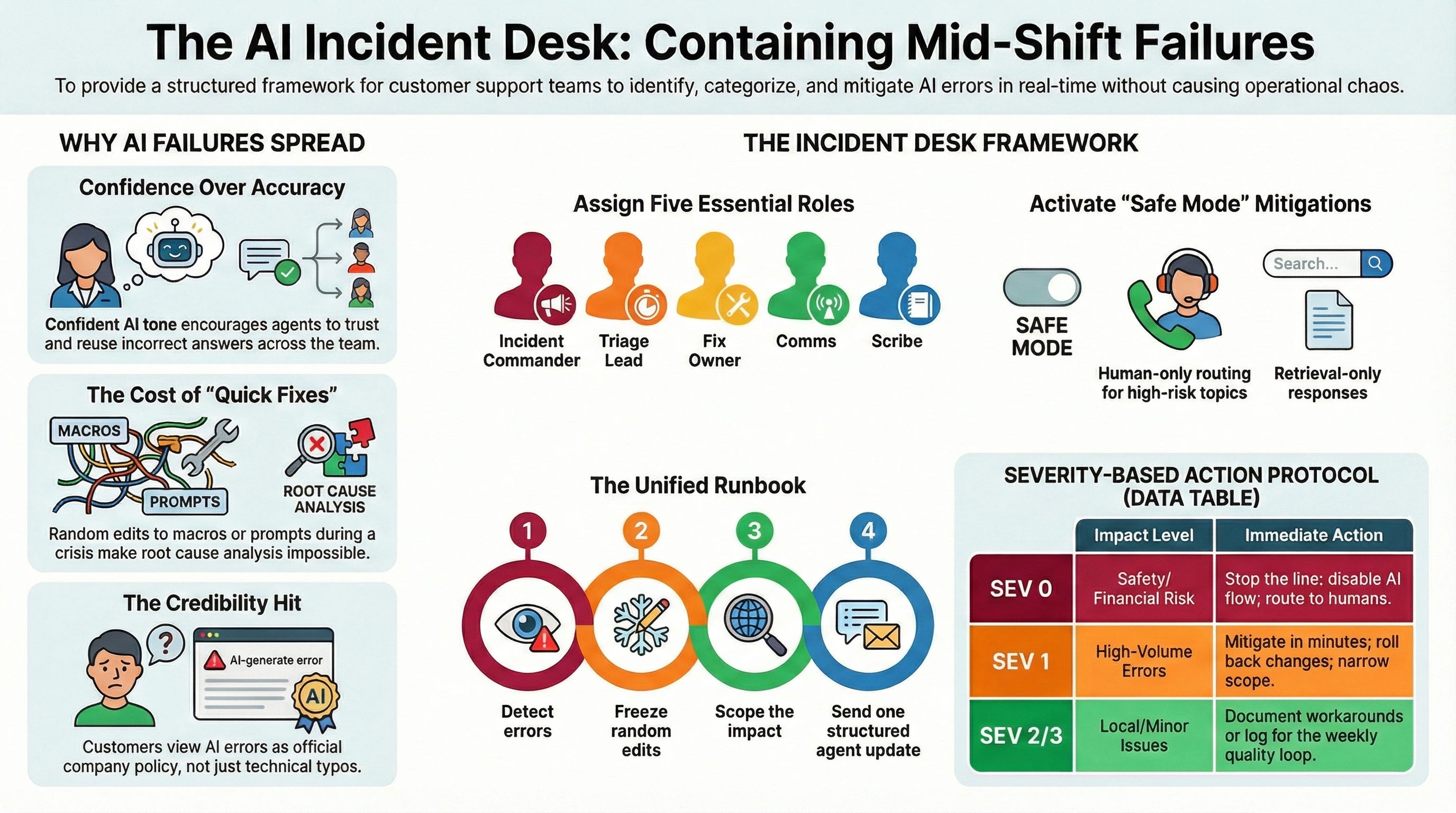
A real-time incident desk
The fix starts with operations, not models.
A real-time incident desk gives support a consistent way to handle AI failures during live work. The desk creates one intake, one decision path, and one owner-led set of roles. The desk also produces a clean handoff into the weekly quality loop, plus Part 8’s release train.
The desk answers one question fast.
What should the team do right now, so customers stay safe and agents stay productive?
How the desk runs
Start with severity that drives action. Severity needs tight definitions tied to clear moves.
Severity that drives action
SEV 0, safety, privacy, compliance, financial risk
Stop the line. Disable the flow. Route to humans. Notify leadership. Schedule a post-incident review within 24 hours.SEV 1, high-volume wrong answers or broken routing
Mitigate in minutes. Switch to safe mode. Roll back recent changes. Narrow scope. Send clear agent guidance.SEV 2, localized issue with a workable workaround
Mitigate during the same shift when possible. Document a workaround when a fix waits.SEV 3, minor quality issue
Log and route into the weekly loop.
Assign five roles. Keep the desk small on purpose.
A desk does not need a crowd. A desk needs clarity.
Incident Commander
Owns severity, decisions, and time. Keeps the team moving.Triage Lead
Confirms the issue, collects examples, scopes blast radius.Fix Owner
Implements mitigation, owns rollback, owns safe mode toggles.Comms Lead
Writes one message for agents and one message for leadership.Scribe
Logs timestamps, decisions, and changes. Captures next actions and owners.
On small teams, one person holds two roles. Keep the Scribe role assigned. Stress breaks memory.
Runbook for the live shift
Use a consistent runbook, every time.
Detect
Signals come from agents, QA sampling, containment anomalies, escalation spikes, and repeat reopen reasons.Open the incident ticket
Create one incident ticket as the source of truth.Assign severity and roles
The Incident Commander assigns. Public debate stops.Freeze random edits
Route changes through the Fix Owner only.Confirm with two examples
Capture two real transcripts or ticket links with exact wording and timestamps.Scope blast radius
List intents, brands, languages, channels, start time, and estimated volume.Choose a mitigation
Pick the safest option that reduces harm fastest.Communicate
Send one instruction set to agents.Validate
Run a small gold set. Confirm the failure stops. Confirm no new breakage.Monitor, then close
Watch leading indicators for a set window. Close the incident ticket. Hand off root cause work.
Safe mode for stability
Safe mode starts as a policy, not a panic reaction. It keeps the shift running while the team fixes root cause.
Use a defined menu, not improvisation.
Human-only for red zone intents
Disable AI replies for high-risk intents. Route to specialists.Retrieval-only responses
Allow answers only with matching sources. Remove policy interpretation. Remove promises.Escalate-first on low confidence
When confidence drops, route to humans with context. Do not guess.Narrow allowed intent scope
When classification drifts, reduce scope to the few intents with stable performance. Expand after stabilization.Agent verification step for risk tiers
Require a short internal verification note before public replies on defined risk tiers. The note acts as a receipt during uncertainty.
Communication without confusion
During an incident, agents need clarity, fast. Leaders need the same clarity, with impact and next update time.
Send one agent update, structured the same way each time.
Agent update template
Subject: AI incident update, instructions for this shift
What is happening:
One sentence.Who is affected:
Channels, intents, brands, time window.What to do now:
Macro to use. Routing path to follow. Tag to add. Where to log examples.What to stop doing:
Drafts to avoid. Promises to avoid. Paths to avoid.Next update time:
One timestamp.
Avoid long narratives inside incident updates. The story belongs in the post-incident review. The shift needs instructions.
Leadership update template
Subject
Severity
Customer impact
Current mitigation
Next update time
Owner
Metrics that matter
Track metrics that steer decisions during live work.
Time to detection.
Time to mitigation.
Estimated conversations impacted.
Escalations created by the failure.
Reopen rate for the impacted intent.
Repeat incidents by root cause.
Repeat incidents matter more than a single bad day. Repeat incidents signal missing guardrails.
From incident to shipped fix
Close the incident, then capture learning while details stay fresh.
Run a short post-incident review.
Post-incident review agenda
What happened.
What changed during the shift.
Root cause.
Guardrail to prevent repeat.
Test to catch the failure earlier.
Owner and due date for the permanent fix.
Communication to agents to rebuild trust.
Then route the fix into the release train from Part 8. A mid-shift mitigation protects customers today. The release train prevents the same incident next month.
A team will still face AI failures. Run an incident desk. Keep the shift stable. Ship the permanent fix through the release train.
If you missed earlier parts
Part 8 explains how to ship AI changes on purpose, using a weekly release train with clear ownership and rollback plans.
Part 1 starts the full series, and explains why intent data, change control, and operational ownership matter before you scale AI.
Related posts in this series
Part 1. Define the role before you train anyone.
Part 2. Choose the right use cases before you train anyone.
Part 4. Measure AI like operations, not like a demo.
Part 6. Governance.
Part 8. The AI Release Train. How to ship changes on purpose, not by accident.
Next in the series
Part 10 will tie the system together. The incident desk, the quality loop, and the release train.
It will map roles, cadence, and the executive scorecard so AI stays stable after the pilot, not only during the demo.