


AI tool decisions look cleaner before they meet the support queue.
A support leader is sitting in a vendor demo with a routing report open in another tab. One screen shows the promise. The other shows the operating reality.
The vendor shows the usual promise: containment rate, auto-resolution, suggested replies, AI QA, intent detection, and escalation prediction. The dashboard looks clean because dashboards do not have to survive production.
The screenshots look impressive because screenshots always behave better than production. Screenshots never meet a customer using two email addresses, a school contact asking about a vendor policy, or a parent who opens three tickets because the first answer did not make sense.
On the other screen, the support leader sees the real system.
Twenty-one percent of tickets touched more than one queue last week. A policy article has two versions in two places. Tier 1 agents use different macros for the same issue. Escalations arrive in Slack with no ticket summary, no source checked, and no owner. The chatbot is being blamed for answers pulled from outdated knowledge.
The executive question sounds simple.
Should we buy the AI tool, build something ourselves, or wrap AI around our existing stack?
The operational answer is less convenient.
First, decide whether you are solving an AI problem or a workflow problem wearing a software costume.
That is where the real decision starts.
What changed
For years, support technology decisions followed a familiar pattern. Volume increased, leaders bought tools to absorb work. More tickets meant more macros, more routing, more help center articles, more workforce planning, and more agent seats.
AI changed the shape of the decision.
The question is no longer, “Which tool saves the most time?”
The better question is, “Where does our support system create cost, risk, rework, and lost trust?”
A chatbot may reduce routine tickets. Agent assist may reduce handle time. AI QA may expand review coverage. Summaries may clean up handoffs. All of that has value.
But none of it fixes broken ownership.
If the workflow is messy before AI, AI will scale the mess faster.
If routing is unclear, AI will hand off confusion. If knowledge conflicts, AI will quote the wrong source with confidence. If escalation ownership is vague, AI will add a summary to a broken process and everyone will celebrate the summary, because apparently polishing dents on a moving car now counts as transformation.
This is the core claim of the series:
AI support ROI is not automation rate. It is the relationship between cost, quality, risk, and retained customer trust.
By the end of this article, you will have a practical way to decide when to buy, when to build, and when to wrap AI around your existing support operation.
The economic problem
The buy, build, or wrap decision gets framed as a technology decision.
That is the first mistake.
It is an economic decision.
A vendor tool has license cost, implementation cost, integration cost, admin cost, training cost, QA cost, and exception cost. Internal builds have engineering cost, maintenance cost, opportunity cost, support ops cost, compliance cost, and failure cost. Wrappers have orchestration cost, data quality cost, change management cost, and ownership cost.
The visible expense is rarely the full expense.
The hidden expense sits inside the workflow.
A misrouted ticket is not only a routing issue. It creates customer delay, agent rework, queue noise, SLA pressure, and often an unnecessary escalation. A weak knowledge article is not only a content issue. It creates wrong answers, repeat contacts, AI answer drift, QA misses, and trust loss. Vague ownership creates Slack archaeology, duplicated work, and the sacred ritual of “does anyone know who owns this?”
Here is the basic economics:
Net AI value = avoided routine labor minus AI-created rework, escalation cost, QA cost, knowledge maintenance, workflow maintenance, and trust risk.
That formula will not fit neatly on a vendor slide.
That is why it belongs in an operating review.
A support leader should not start with, “Which tool has the best AI?” Start with sharper questions: what work breaks today, who owns the source of truth, what risk increases if this flow scales, what work disappears, what new work appears, and what will we measure after launch?
If leadership cannot answer those questions, they are not making an AI decision. They are placing a bet.
The operating mistake leaders make
The most common mistake is buying AI to compensate for work the organization has refused to define.
The team has unclear routing, so leadership buys intent detection.
The knowledge base is stale, so leadership buys retrieval.
Agents write inconsistent replies, so leadership buys generated responses.
Escalations lack structure, so leadership buys summaries.
Reporting is weak, so leadership buys an AI dashboard.
Some of those purchases may still make sense. The issue is sequence.
When the workflow is broken, the tool becomes the workaround. Then the workaround becomes the operating model. Then, six months later, someone asks why the AI tool is underperforming.
The answer is usually sitting in the support queue, waving both arms, while everyone pretends the problem lives inside the model.
In one high-volume support environment, we saw this pattern around routing. The team handled multiple customer types, multiple programs, and different policy rules. Parent questions, school questions, vendor questions, reimbursement questions, identity questions, and escalation paths all touched the same support ecosystem.
The instinct was to make AI smarter at identifying intent.
That helped, but only after we cleaned up the workflow.
The real issue was not intent detection alone. Several intents had no clean owner after detection. AI could classify the request, but classification did not resolve the operational question:
Who owns the next step?
That distinction matters.
AI can recognize a reimbursement issue. AI cannot magically decide the ownership model leadership has avoided defining. Tragic. The machine declined to do org design for free.
The better model
The better model starts before tool selection. Map the support workflow first, then decide which layer of AI belongs on top.
You have three possible moves: buy, build, or wrap. None of them is the “right” strategy by default. The right answer depends on workflow economics.
Buy when the workflow is common, the risk is manageable, vendor capability is ahead of what your team should build, and integration into your support stack preserves enough context.
Build when the workflow is unique to your business, ownership requires tight internal control, or the support experience is part of your product advantage.
Wrap when your existing systems hold the truth, but your team needs AI to connect, summarize, classify, route, verify, or assist across them.
The mistake is treating these as ideological choices.
Some leaders want to buy everything because it feels faster. Some want to build because they do not trust vendors. Some want to wrap because they already have too many systems and somehow believe one more layer will make everyone calmer.
The right answer depends on workflow economics.
Fix the workflow first. Then buy, build, or wrap based on control, risk, uniqueness, integration, and measurable value.
The Buy, Build, or Wrap scorecard
Use this scorecard before signing a vendor contract, assigning engineering work, or turning a workflow into an AI pilot.
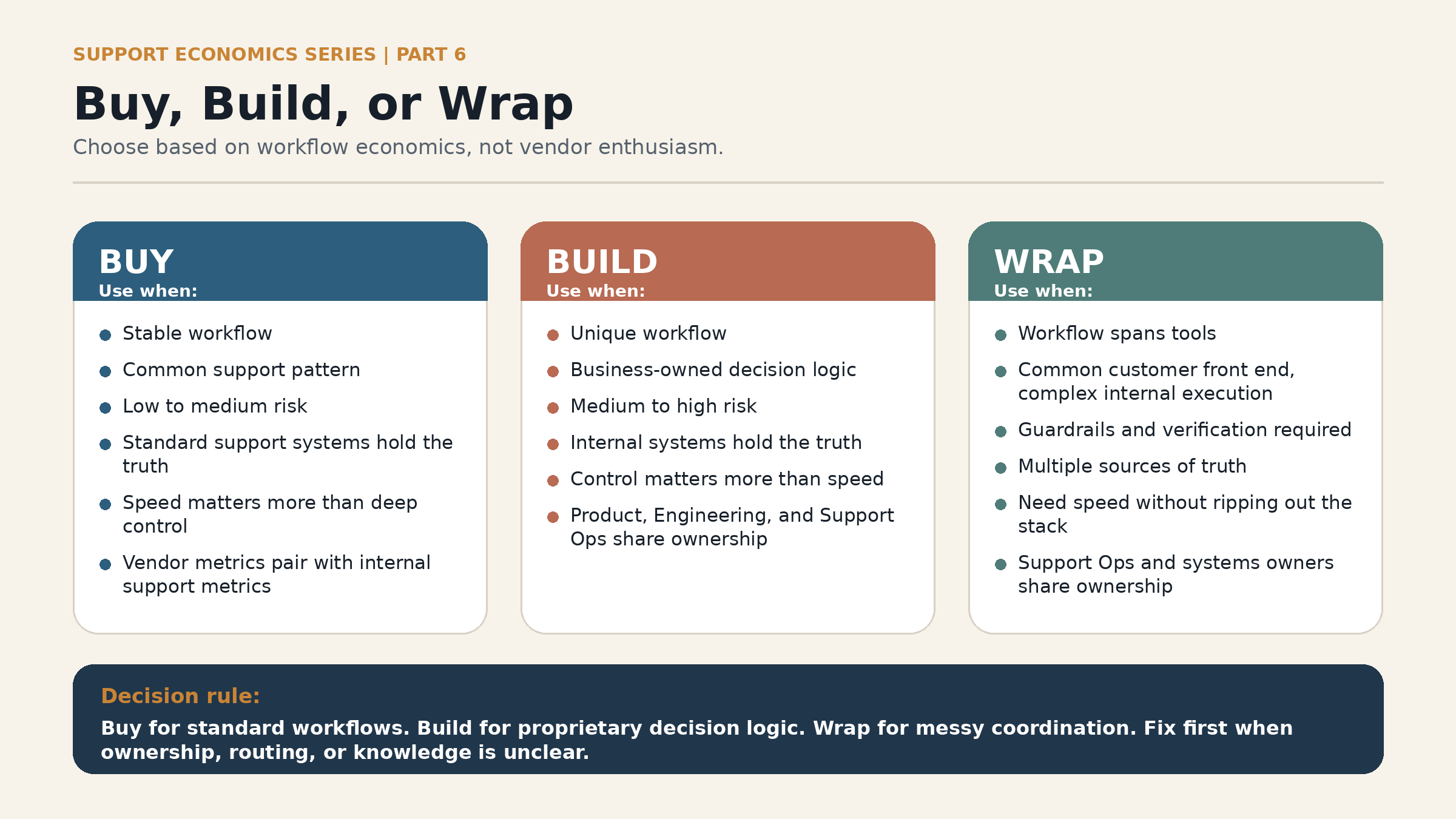
The scorecard should not be used alone. Use it with a hard gate.
If any of these are true, fix the workflow before AI expansion:
No single owner for the workflow.
Conflicting knowledge sources.
Routing changes based on agent memory.
Escalations happen mainly in Slack.
No metric for recontact, misroute, or correction cost.
No rollback path exists when AI gets the flow wrong.
That gate prevents the most expensive version of AI adoption.
Automating confusion.
How this works in a real support org
Take a reimbursement support flow.
The customer asks why a reimbursement was denied. The issue may involve eligibility, purchase date, required documentation, policy rules, payment status, vendor category, and state or program rules. The message may include sensitive information. The customer may have already tried self-service and now believes the company is hiding behind automation.
This is not a clean chatbot problem.
It is a workflow problem with AI opportunities.
Before selecting buy, build, or wrap, the team maps the flow from customer question to trusted answer. That means identifying the systems of record, the policy source, the required verification fields, the escalation point, the approved customer language, and the lines AI should never cross.
Once the map exists, the AI decision becomes clearer.
If the issue is a simple “where is my reimbursement” status request, buying a vendor workflow or using an existing support platform AI feature may work. The process is common, the answer sits in structured data, and the risk is manageable with guardrails.
If the issue requires unique program rules, sensitive eligibility logic, or internal approval steps, building internal workflow logic may make more sense. The company owns the decision rules and should control the experience.
If the issue spans CRM data, payment tools, policy docs, and human escalation, a wrapper may be best. AI summarizes the ticket, identifies the likely issue, checks retrieval against approved knowledge, routes to the right queue, and prompts the agent to verify required fields before responding.
In that case, AI does not own the resolution.
AI reduces the cost of coordination.
That is the difference between automation and operational leverage.
Automation tries to remove the human. Operational leverage removes the unnecessary searching, rewriting, rereading, rerouting, and guessing around the human.
The first makes good demos.
The second improves support economics.
What executives should understand
Executives often want a simple answer: buy is faster, build gives more control, and wrap is more flexible. That summary is true, but not useful enough. The real executive question is where the company needs control.
Executives do not need a feature comparison first. They need to know where the company needs control.
Customer promise: If AI gives the wrong answer, what did the company commit to?
Policy interpretation: If rules change, how fast does the system update?
Financial exposure: If the answer affects money, credits, refunds, eligibility, or account access, who verifies it?
Operational ownership: If the flow breaks, who fixes it?
Customer trust: If the customer already tried self-service, will AI reduce effort or make them repeat themselves?
This is where finance should pay attention.
A lower cost per contact looks good until repeat contact rises. Deflection looks good until reopens increase. Containment looks good until escalations arrive with worse customer emotion and less context. Agent assist looks good until agents spend more time correcting AI than writing the reply themselves.
No CFO should approve AI expansion based on automation rate alone.
Ask for the full cost picture: what routine work went down, what rework went up, what escalation cost changed, what QA cost changed, what knowledge maintenance increased, and what customer trust metric moved.
If the reporting only shows the first number, the model is incomplete.
The decision rule
Here is the rule I would use with any executive team.
Buy for standard workflows. Build for proprietary decision logic. Wrap for messy coordination across systems. Fix first when ownership, routing, or knowledge is unclear.
That last sentence is the part teams skip.
Fix first does not mean delay forever. It means make the workflow legible enough for AI to help.
A one-week workflow cleanup may save three months of vendor disappointment.
Before you automate, write down the current path from customer question to trusted answer. Then mark every point where the work depends on memory, judgment, Slack, tribal knowledge, or a person everyone privately relies on.
Those are not edge cases.
Those are your operating system.
AI will touch them.
The hard part people miss
The invisible labor usually sounds small until you map it. Someone knows which macro is safe. Someone knows which team really owns the issue. Someone knows the knowledge article is wrong but has not had time to fix it. Someone knows the escalation path depends on who is online. Someone knows the reporting is directionally right, but not clean enough for financial decisions.
AI exposes those weak points.
That exposure is useful if leaders treat it as signal. It becomes expensive if leaders treat it as agent resistance, vendor failure, or “AI needs more training.”
The fix is simple, but not effortless.
Name the owners. Support Ops owns routing logic. Knowledge owns source quality. QA owns outcome review. Support leadership owns red zones and human approval. Engineering or systems owners own integration reliability. The executive sponsor owns risk tolerance and tradeoffs.
When no one owns a workflow, AI becomes the owner by default. That should make every support leader uncomfortable.
What support leaders should do next Monday
Start with one workflow, not the entire support org. Pick a flow with volume, cost, confusion, and risk. The goal is not to admire the mess. The goal is to make the workflow clear enough for AI to help.
Map the workflow from customer question to trusted answer. Include every queue, system, article, macro, escalation path, and approval point.
Mark every failure point. Look for misroutes, repeat contacts, unclear ownership, missing fields, stale knowledge, and tickets escalated through chat instead of process.
Assign one owner per layer. Routing owner, knowledge owner, QA owner, escalation owner, and executive risk owner.
Score the workflow using buy, build, or wrap. Do not score the tool first. Score the work first.
Define the success metric before launch. Use recontact rate, misroute rate, escalation rate, correction rate, AI handoff success, or time to trusted resolution.
Run a small pilot with human review. Sample AI outcomes. Read the misses. Do not only review the beautiful dashboard, unless you enjoy expensive fiction.
Create a weekly improvement loop. Review failures, classify the cause, ship one workflow fix, and report the operational change.
Set a rollback rule. If risk rises, recontact rises, or AI confidence exceeds source quality, narrow the scope until the workflow stabilizes.
This is not slow. This is disciplined.
Slow is buying a tool, training the team, launching the flow, confusing customers, cleaning up escalations, arguing with the vendor, and then discovering the original routing model was broken.
That kind of speed is just delay wearing nice shoes.
The executive scorecard
When you report this work, use a scorecard that shows whether AI improved the workflow, not whether the demo looked clean.
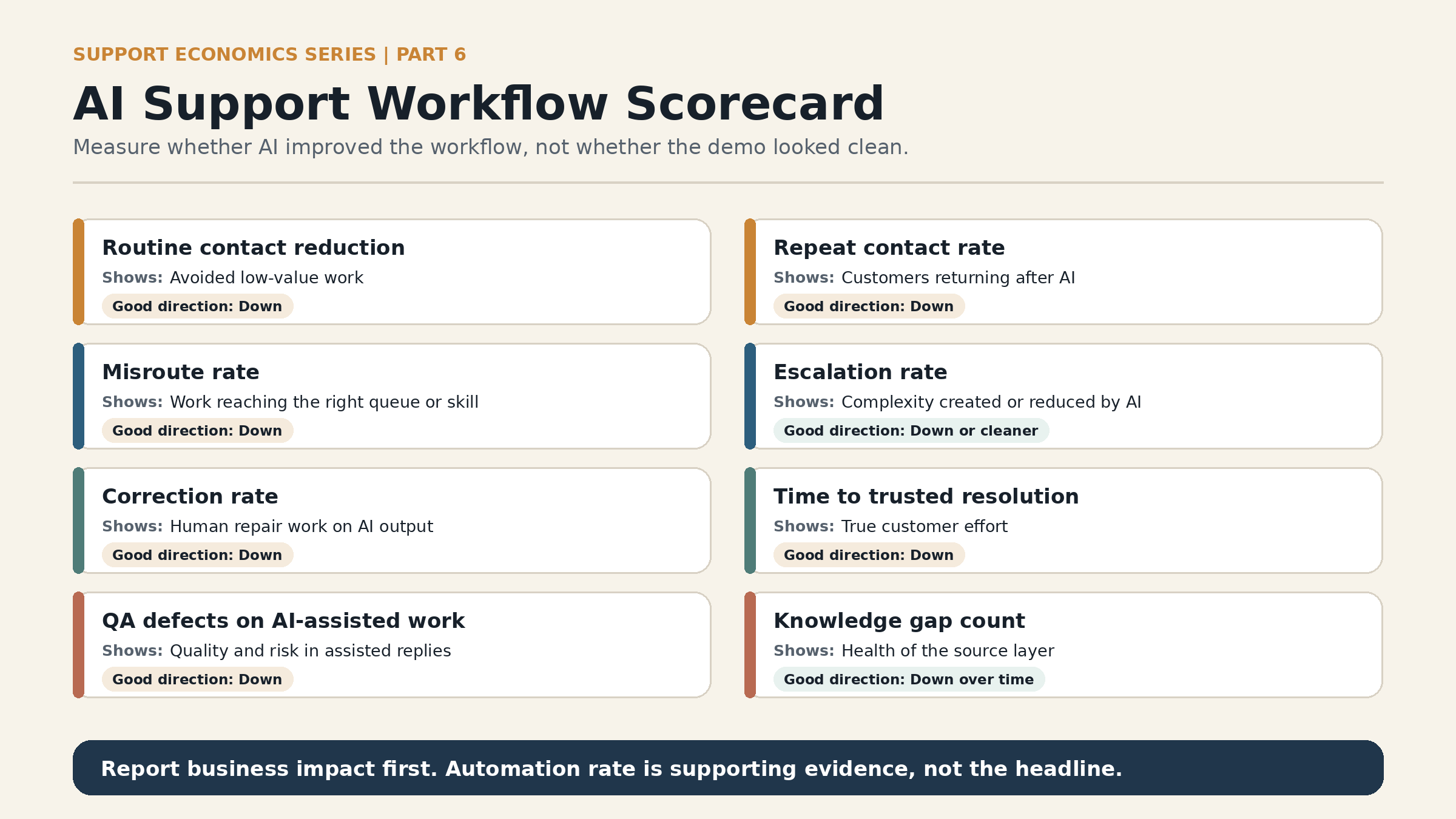
When you report this work, do not lead with “AI handled X percent.”
Lead with business impact.
The goal is not to prove AI is perfect. The goal is to know where it helps, where it creates cost, and where the workflow still needs ownership.
The close
Back in that vendor demo, the dashboard still matters. Containment matters. Agent assist matters. AI QA matters. Routing intelligence matters.
But none of those answers the first question: is the workflow ready?
If the answer is no, the decision is not buy, build, or wrap. The decision is fix first.
Do not automate confusion. Fix the workflow before you let AI scale it.
One question for readers:
Where is your support workflow most fragile right now: routing, knowledge, ownership, escalation, or measurement?