


A support leader opens the queue on Monday morning and sees a strange kind of good news. Ticket volume is down. The AI agent handled more contacts over the weekend. Search deflected a few common questions. Some basic issues never reached the team.
Then the escalations start. A parent followed the wrong process because an article left out one exception. An agent used a macro that said something slightly different from the Help Center. The AI agent gave a confident answer based on an old policy article. Three customers reopened tickets after reading the same documentation because the next step was unclear.
On paper, support looks more efficient. In practice, the team spends the morning unwinding confusion that started in the knowledge base.
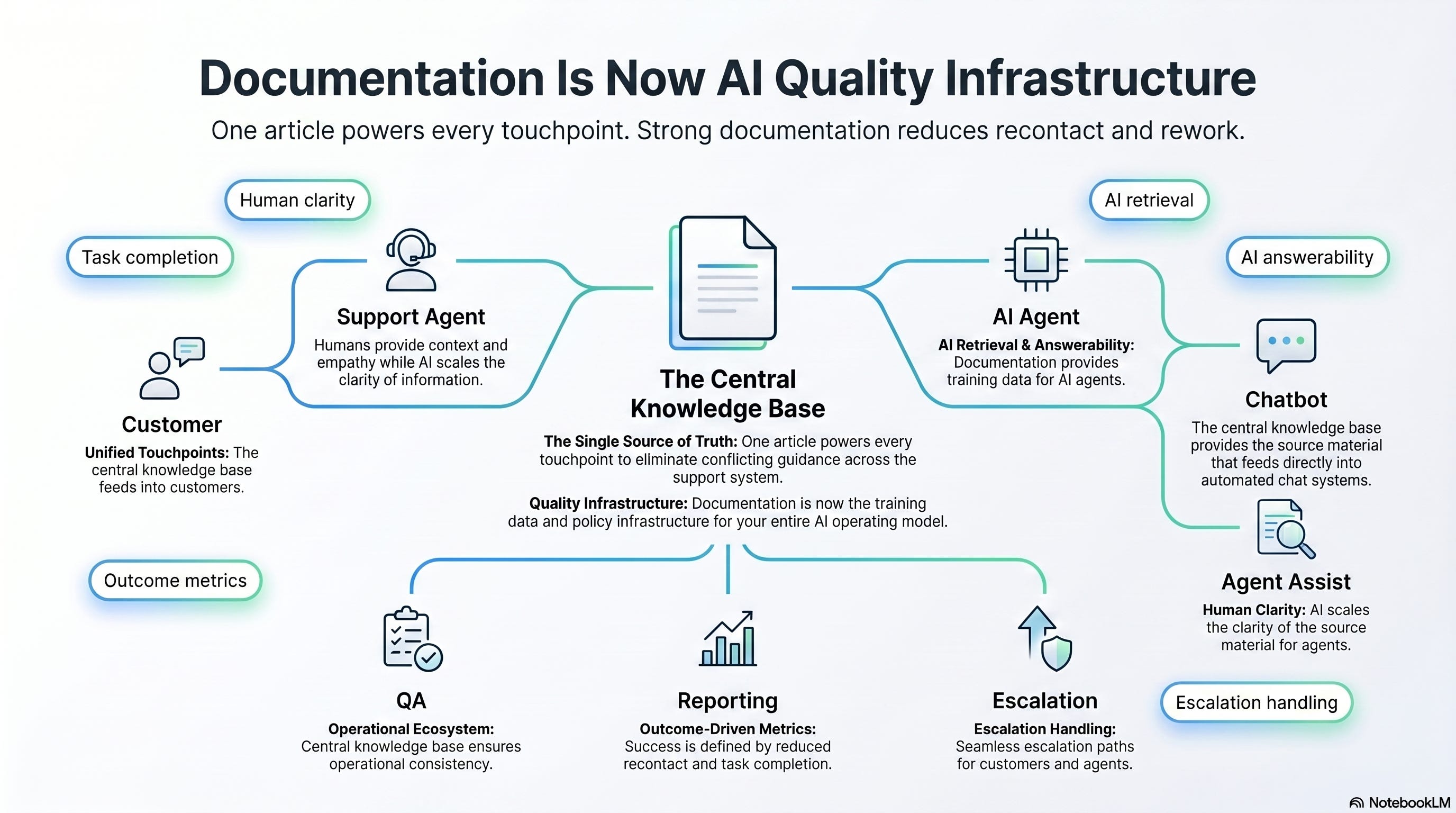
That is the shift many support teams are missing. Documentation is no longer just a self-service asset. It is training data, policy infrastructure, agent guidance, AI source material, and customer education sitting in one place. Because apparently one article now has to satisfy a customer, a new agent, an AI agent, a workflow, and an executive dashboard. Civilization marches on.
What changed
Support documentation used to serve a simpler purpose. A customer searched the Help Center. An agent sent an article. A manager reviewed article views, helpfulness votes, and maybe deflection. The stakes were real, but the blast radius was smaller.
Now the same article might be used by a customer trying to solve their own issue, a new agent learning a process, a chatbot answering questions, an AI agent deciding whether to contain or escalate, or an agent assist tool drafting a response. That same article might also influence reporting, QA, escalation patterns, and customer trust.
This creates a new operating problem. Bad documentation does not stay inside the Help Center anymore. It leaks into AI answers, macros, internal workflows, QA reviews, and frontline conversations.
Humans fill in gaps. They remember the process changed last week. They ask another agent. They know when the article is technically correct but practically incomplete.
AI does not do that unless the system around it forces that behavior. AI reads what you give it. Then it scales the quality of that source material. Sometimes it scales clarity. Sometimes it scales confusion with the confidence of a tiny executive who never reads the room.
The economic problem
Most AI support savings models assume documentation is ready. That assumption is dangerous.
A vendor demo usually shows an AI agent answering a clean question from a clean article. That is useful for a demo. It is not how real support works. Real support has articles written by different owners, old screenshots, state-specific exceptions, policy changes, product changes, macro drift, internal workarounds, and one Slack thread with the answer everyone uses.
Then someone points AI at the Help Center and expects savings.
This is where the math starts lying. An AI agent might contain 40 percent of contacts, but that number means little unless you know what happened after containment. Did the customer recontact support? Did the AI give the right next step? Did the agent have to correct the answer later? Did the issue escalate anyway? Did the customer give up because the answer was unclear?
If you only count the avoided ticket, you miss the hidden cost.
The real cost of documentation failure is not article maintenance. The real cost is rework. It shows up as longer handle time, repeat contacts, escalations, QA review, policy cleanup, manager intervention, and customer frustration.
That is why support documentation needs a stronger assessment model. Not a style checklist. Not a content audit that only checks titles and formatting. An operating scorecard.
The operating mistake leaders make
The common mistake is treating documentation quality like a writing problem.
Clear writing matters. Structure matters. Tone matters. Screenshots and formatting matter too. Nobody is arguing for a Help Center that reads like a tax form written by a committee trapped in a windowless room.
But in AI-enabled support, those are the starting line. The bigger question is whether the article produces the right operational outcome when humans and AI use it.
A polished article that leads to repeat contacts is not good documentation. A friendly article that leaves out an exception is not good documentation. A short article that an AI agent cannot retrieve is not good documentation. A detailed article that buries the answer in six paragraphs is not good documentation. A customer article that conflicts with an internal macro is not good documentation.
Support teams need to stop asking only, “Is this article clear?” They need to ask whether a customer completes the task, whether an agent applies the policy consistently, whether an AI agent retrieves the right article, whether the answer gets extracted safely, and whether the article reduces recontact, escalation, and rework.
That is a different standard. It is also a better one.
The better model
A strong documentation model has to serve two audiences at the same time. Humans need clarity, context, and confidence. AI agents need source material that is retrievable, extractable, current, specific, and unambiguous.
Those needs overlap, but they are not identical.
For humans, a good article answers whether the article applies to them, what they need to do, what happens next, what they should avoid, and when they need help.
For AI, a good article answers which intent it covers, which customer language maps to it, where the direct answer lives, what the rules and exceptions are, and when the AI should not answer automatically.
That last point matters. One of the most useful things documentation does is tell AI when not to answer.
A support article should support containment when the path is safe. It should support escalation when the path is risky. Both outcomes have value. The goal is not containment. The goal is correct resolution.
A documentation assessment scorecard
I would score each article out of 100 points across nine areas: human clarity, task completion, AI retrieval quality, AI answerability, structure, accuracy, escalation handling, localization readiness, and maintenance readiness.
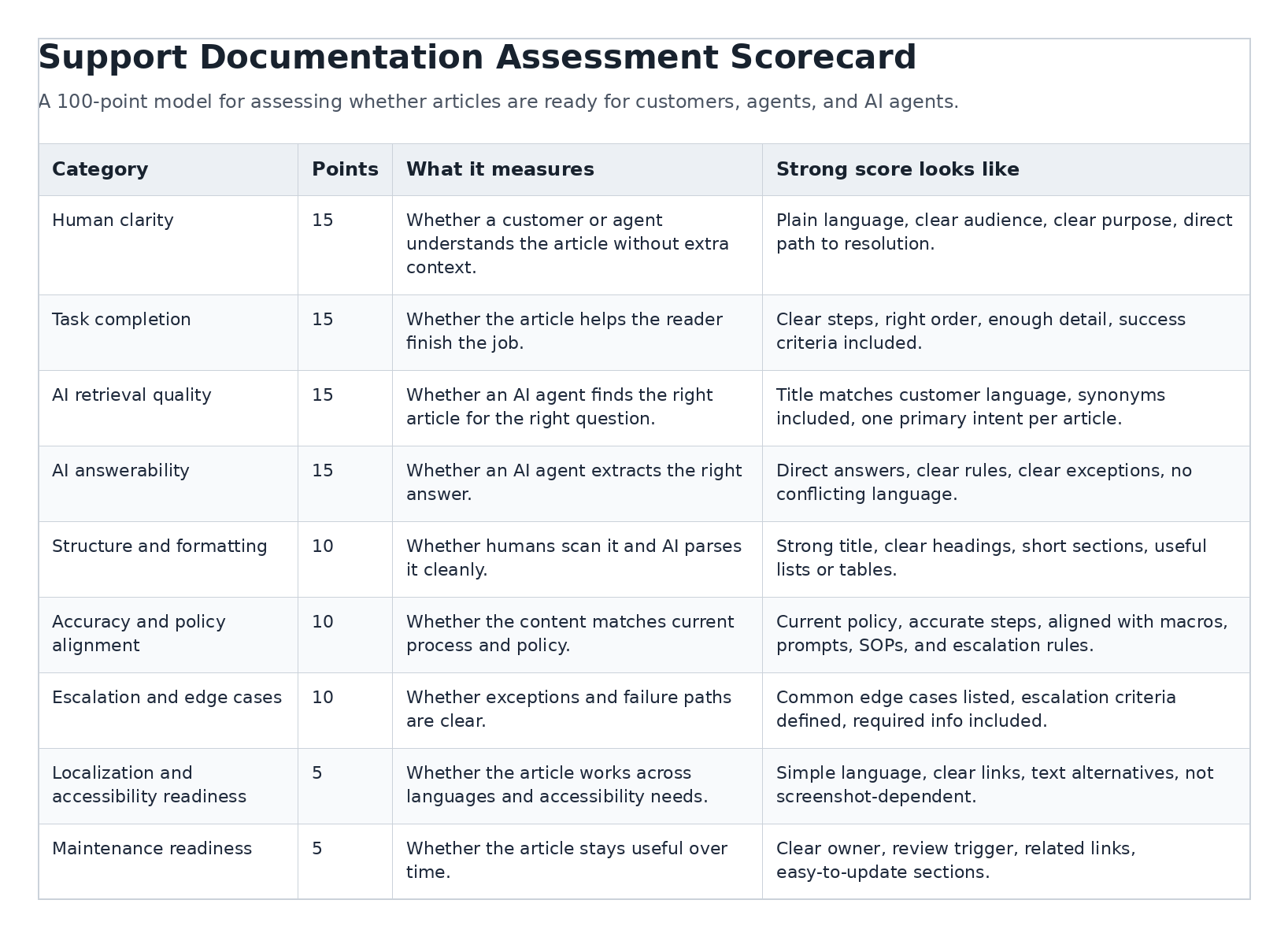
This scorecard gives support teams a practical way to decide whether an article is ready for customers, agents, and AI agents. It also creates a shared language across Support, Ops, Product, Knowledge, and AI teams. That shared language matters because “the article needs work” is too vague to drive action. “This article is strong for human clarity but weak for AI answerability and escalation handling” is much more useful.
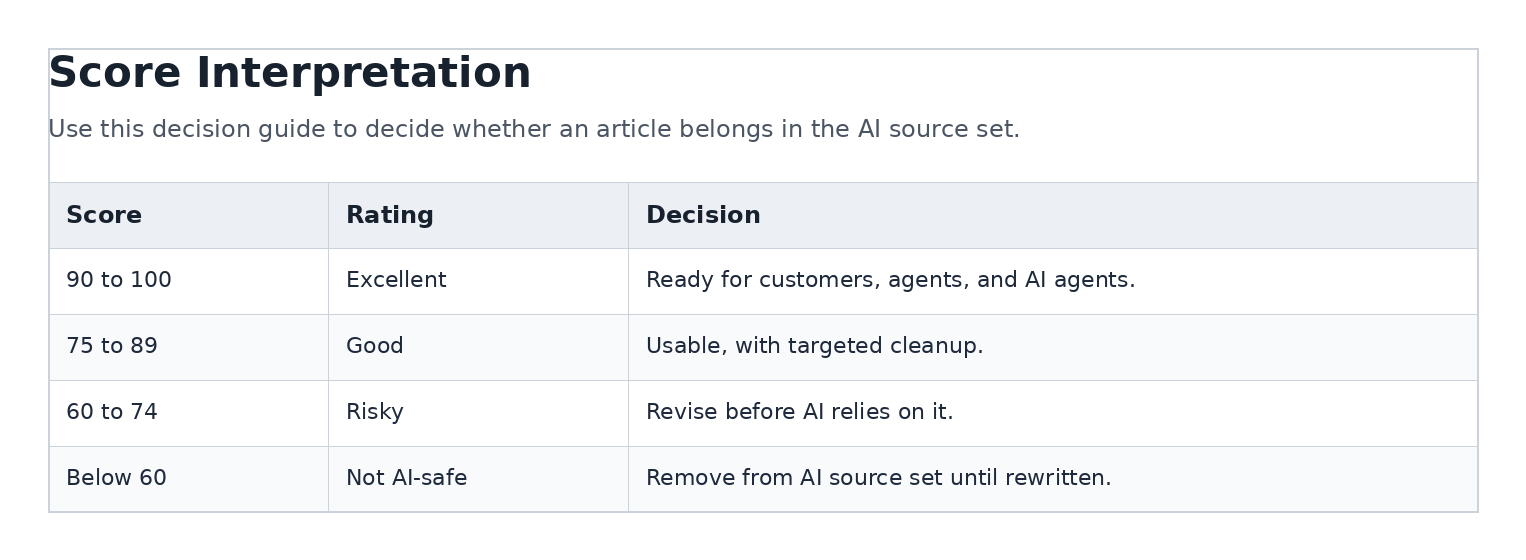
An article scoring 90 to 100 is ready for customers, agents, and AI agents. A score between 75 and 89 means the article is usable, but needs targeted cleanup. A score between 60 and 74 means the article is risky and should be revised before AI relies on it. Anything below 60 should be removed from the AI source set until it is rewritten.
That “AI-safe” distinction matters.
An article might be acceptable for a human to read while still being unsafe as an AI source. Humans notice gaps, ask follow-up questions, and adjust based on context. AI scales the source material.
If a human reads a weak article, one conversation might go wrong. If AI reads a weak article, hundreds of conversations might go wrong before anyone notices.
Once scored, each article should land in one of four decision bands.
How to test an article before AI relies on it
The scorecard is useful, but scoring alone is not enough. You also need a retrieval and answerability test.
Use five real customer questions for each article. Not perfect test questions. Real ones. Messy ones. Questions written the way customers ask for help when they are frustrated, rushed, confused, or using the wrong vocabulary.
For each question, check whether search or AI retrieval surfaced the article, whether the AI chose the right source, whether it extracted the correct answer, whether it gave the right next step, and whether it avoided unsupported claims.
After scoring, run the article through a practical retrieval and answerability test.
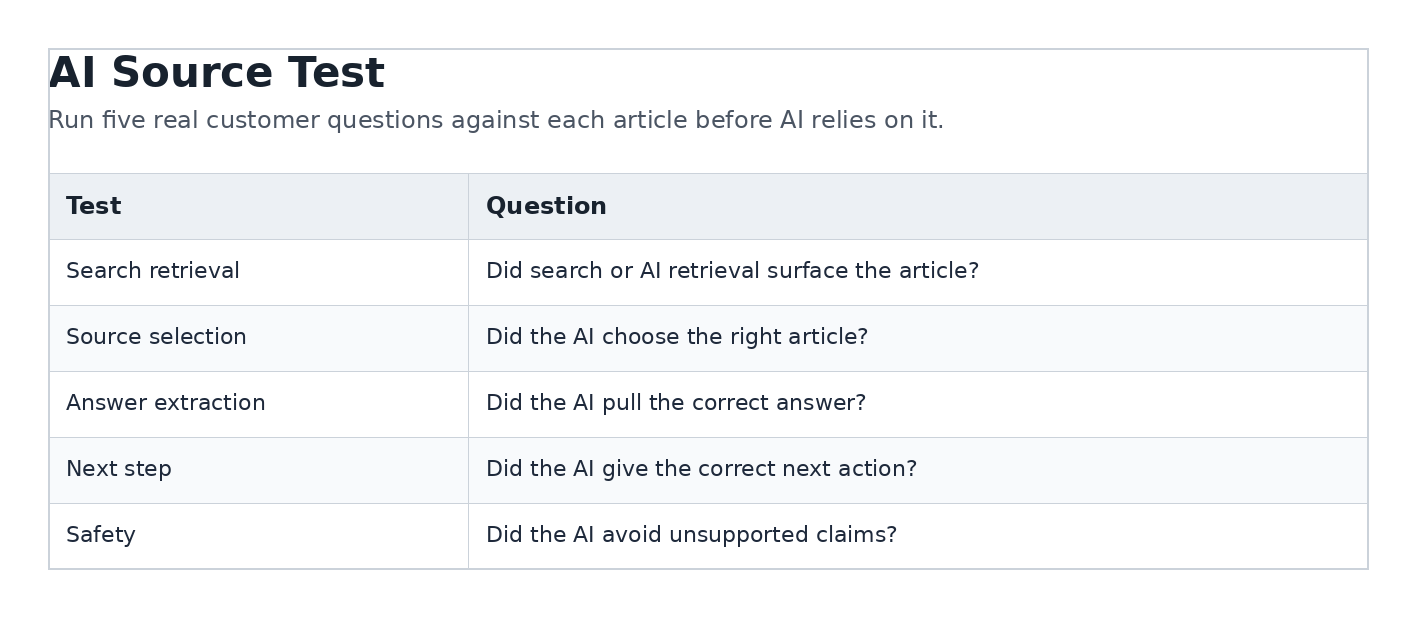
This test changes the documentation conversation. Instead of debating whether an article looks good, you test whether it works.
That is the difference between content review and operational review.
A simple rule works well. If the article passes all five checks, it is a strong AI source. If it passes four, it is usable with minor edits. If it passes three, revise it before broad AI use. If it passes two or fewer, remove it from the AI source set.
The point is not to punish the article. The point is to protect the customer, the agent, and the business from a bad answer dressed up as automation.
Example from a real support workflow
Take a common article: “How to update your email address.”
On the surface, this looks simple. The customer wants to change an email address. The article explains where to go in account settings. Done.
Except support leaders know the workflow is rarely that simple.
What if the customer no longer has access to the old email address? What if the email address is tied to an application? What if the account contains sensitive documents? What if the requester is a parent, school, vendor, or internal user? What if changing the email creates account takeover risk?
A weak article says, “Go to your profile settings and update your email address. If you need help, contact support.”
That article might pass a basic readability check. It might even get helpful votes from customers who follow the standard path. But it is incomplete as an operating source.
A stronger article separates standard self-service from restricted cases. It states when support must verify ownership. It explains what information the customer needs to provide. It tells the AI agent when to escalate. It tells the human agent what not to change over phone or chat. It aligns with the macro, internal SOP, and security policy.
Now the article serves the whole system. The customer gets the right path. The agent gets the right guardrails. The AI agent knows when to answer and when to escalate. The support leader reduces rework and risk.
Same topic. Completely different operating value.
What executives should measure
Executives should not measure documentation only by page views or article helpfulness. Those metrics have value, but they do not tell the whole story.
The better question is whether documentation reduces unnecessary cost without increasing risk. That means measuring what happens after the article is used.
Did the customer recontact support? Did the AI answer trigger an escalation? Did the agent override the AI-generated response? Did the same customer return within 3, 7, or 14 days? Did containment improve while quality declined?
These questions show whether documentation is creating real savings or moving the cost somewhere else.
The final test is not whether the article was viewed. It is what happened after the article was used.
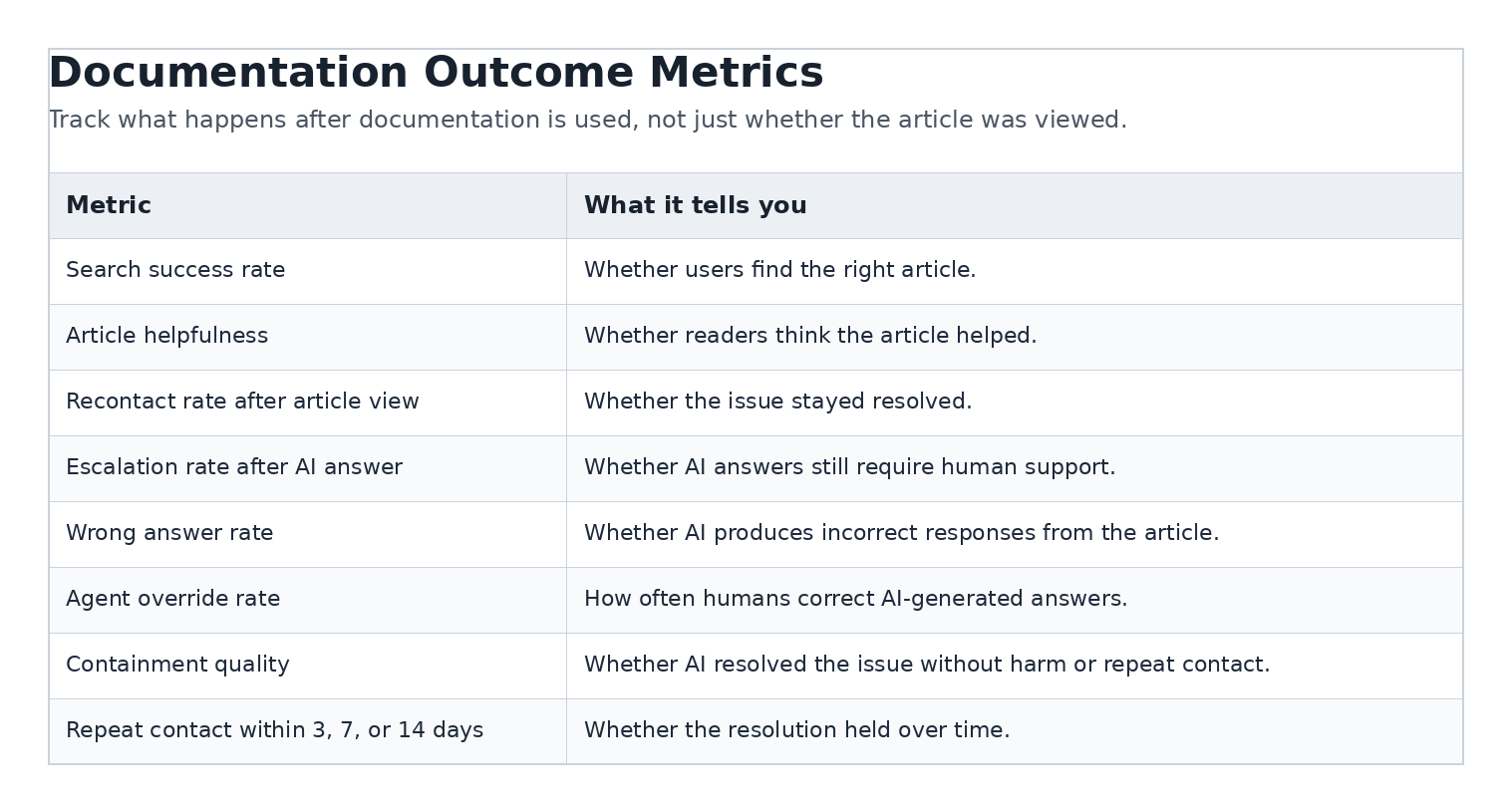
This is where support economics become clearer.
If documentation reduces ticket creation but increases recontact, the savings are fake. If AI containment improves but agent override rate rises, the savings are incomplete. If handle time drops on simple issues but escalations become more complex, staffing needs do not disappear. They shift.
That is the pattern I have seen in real support operations. Routine volume drops. Complexity rises. The team does not become less important. The job changes.
Support leaders need fewer people doing repetitive answer work and more people managing judgment, exceptions, content quality, AI performance, escalation paths, and customer risk.
That is not a vendor story. That is an operating model story.
What support leaders should do next Monday
This does not need to become a six-month knowledge transformation program with a committee, three steering decks, and a folder nobody opens again. Start smaller.
Pick your top 20 articles by volume, AI usage, or escalation impact. Score each one using the 100-point model. Run five real customer questions against each article. Then assign one of four decisions: keep in the AI source set, revise and monitor, remove from the AI source set until fixed, or archive and consolidate.
After that, look for patterns. Are titles written in internal language? Are exceptions buried? Are articles mixing multiple intents? Are macros saying something different from customer-facing articles? Are AI answers failing because retrieval is poor, or because the article itself is unclear?
That review will tell you where the real documentation debt lives.
It will also make your AI support strategy more honest. The issue is rarely “the AI is bad” or “the article is bad” in isolation. The issue is the system around them.
A support article now sits inside a chain: customer question, retrieval, source selection, answer generation, next step, resolution, and recontact or no recontact. That chain is only as strong as the weakest step.
Bonus: A prompt to run a first-pass documentation audit
If you want to pressure-test your Help Center, use the prompt below with a browser-based AI assistant like the Claude Chrome extension.
This should not replace human review. It should give your team a faster first pass.
The goal is to find weak spots faster, not outsource judgment. A support leader still needs to validate policy, compliance, security, escalation paths, and high-risk workflows.
Use the prompt to review your top articles, identify AI-readiness gaps, and prioritize cleanup work before those articles become part of your AI source set.
Claude Chrome extension prompt
You are acting as a Support Documentation Quality Auditor.

Review the knowledge base articles available from this starting page and assess whether
each article is ready for both human readers and AI agents.

Use this 100-point scorecard:
• Human clarity, 15 points
• Task completion, 15 points
• AI retrieval quality, 15 points
• AI answerability, 15 points
• Structure and formatting, 10 points
• Accuracy and policy alignment, 10 points
• Escalation and edge cases, 10 points
• Localization and accessibility readiness, 5 points
• Maintenance readiness, 5 points

Scoring interpretation:
• 90 to 100: Excellent. Ready for customers, agents, and AI agents.
• 75 to 89: Good. Usable, with targeted cleanup.
• 60 to 74: Risky. Revise before AI relies on it.
• Below 60: Not AI-safe. Remove from AI source set until rewritten.

For each article, return:
• Article title
• Article URL
• Primary topic or intent
• Total score out of 100
• Rating
• AI source decision
• Category-level score breakdown
• Top 3 strengths
• Top 3 risks
• Specific rewrite recommendations
• Whether the article should stay in the AI source set

Use this decision language:
• Keep in AI source set
• Keep, but monitor
• Revise before AI use
• Remove from AI source set until rewritten
• Archive or consolidate

Also test each article against 5 likely customer questions.

For each test question, determine:
• Would search or AI retrieval likely find this article?
• Would an AI agent select this as the right source?
• Would an AI agent extract the right answer?
• Would the AI give the correct next step?
• Would the AI avoid unsupported claims?

Score each article’s AI source test from 0 to 5.

At the end, provide:
1. Executive summary
2. Score distribution
3. Article-level findings
4. Common patterns across the knowledge base
5. Highest-risk articles
6. Highest-value quick wins
7. Recommended 30-day cleanup plan
8. AI readiness summary

Be strict. If an article is clear for humans but unsafe for AI, say so.
If an article appears outdated, ambiguous, duplicated, or likely to create repeat contacts,
flag it. The goal is to reduce rework, wrong answers, escalations, repeat contacts, and
customer confusion.
You can copy this prompt and run it against your top 20 articles first. Do not start with the whole Help Center. Start where the risk, volume, or AI usage is highest.
How to use the output
The first audit will not be perfect. That is fine.
The point is not to let AI grade your Help Center in isolation. The point is to find weak spots faster, then apply human judgment where it matters.
That is how the review conversation changes. Instead of asking, “Does this article look good?” you ask, “Would we trust this article to answer customers when no human is watching?”
Documentation is now quality infrastructure
The mistake is thinking documentation is a content library.
It is not.
Documentation is quality infrastructure. It shapes what customers understand, what agents say, what AI answers, what managers coach, and what executives believe about support performance.
If documentation is strong, AI has a safer foundation. If documentation is weak, AI makes the weakness louder.
This is why support leaders need to own documentation quality as part of the AI operating model. Not because support needs another chore. Support has enough of those. Human civilization has already perfected the art of assigning invisible work to the team closest to the fire.
Support needs to own it because documentation is where policy, process, customer reality, and AI behavior meet. That is too important to leave to occasional article cleanup.
The Monday morning queue tells the truth. If volume is down but rework is up, you did not save as much as you think. If containment is up but escalation quality is worse, the system is not healthy. If AI answers are confident but wrong, the source material is not ready.
Would you trust your documentation to answer customers when no human is watching?